
-
×InformationNeed Windows 11 help?Check documents on compatibility, FAQs, upgrade information and available fixes.
Windows 11 Support Center. -
-
×InformationNeed Windows 11 help?Check documents on compatibility, FAQs, upgrade information and available fixes.
Windows 11 Support Center. -
- HP Community
- Notebooks
- Notebook Boot and Lockup
- Re: Windows 10 - Laptop won't go into sleep mode

Create an account on the HP Community to personalize your profile and ask a question
Your account also allows you to connect with HP support faster, access a personal dashboard to manage all of your devices in one place, view warranty information, case status and more.

It has been a while since anyone has replied. Simply ask a new question if you would like to start the discussion again.

10-15-2015 02:39 AM
 HP Recommended
Just try going back to default settings on the power management and this seems to work, though seems too easy.
I am using the HP optimised plan and I had tweaked it heaps, finally reset and hey presto, good battery life.
I have now readjusted to get it to my liking and battery life is better than Windows 8.1
There is no risky downloads, rollbacks, you may lose your preferences but these are easily reset
10-15-2015 09:39 PM
HP Recommended
Has anyone wondered why this problem is not being officlly addressed by HP, Intel or anyone else?
We have a few dozen, maybe a few hundred, users chatting on this forum and fixing their own problems, but there are millions of users of HP and other brands who are experiencing this problem.
Traditionally a new version of Windows requires new hardware because it is more demanding, Windows 10 has changes the game and now the manufacturers need a new driver (no pun intended) for hardware sales.
Now I ask you, why are HP remaining silent and not addressing the problem? Could it be that remaining silent is actually a great way to drive hardware sales without the down side of upsetting the customer base?
Some people may suspect like I do that this lack of support is financially motivated and when they are forced to buy their new hardware will buy another brand, that is OK though because the same will be true of other manufacturers who aren’t supporting their users either. The manufacturers will simply swap a few disgruntled users and that really doesn't bother them.
Call me cynical but there is no downside to this mess for HP because it drives new hardware sales and they get to blame Intel etc. Intel don’t care either because they are selling millions of new chips for the new laptops to the likes of HP.
Like I said you can call me cynical buy if it walks like a duck and quacks like a duck …
10-16-2015 03:35 AM
HP Recommended
The manufacturers simply dont give a @*!*. They sell too much to care.
To be honest nobody whould buy another hardware for a reason like that.
Anyone facing the same problem whould just pay to have his pc fixed if he cant read the forum
( for example someone who doesn't understand english language).
We sould give it a second thought the next time we want to buy an hp product.
You may think that at least they have this official forum, but many forums occur on the net with experts providing support, officially or not!
10-21-2015 08:34 AM
HP Recommended
There is ONE solution to this. I know this because I reset my computer, started from scratch, and made restore points between every update and install that the computer and the HP support center made me do.
The culprit is: Intel High Definition Graphics Driver (screenshot below). DO NOT INSTALL THIS. You can press x and skip this dowload and you don't have to install it. When I installed it, my jump lists stopped working, my notifications and start menu wouldn't work, and the sleep mode problem came back. So, I went to the restore point right before this install, and I have not had a SINGLE problem this time around.
So, if you feel up to it, reset your computer, start from scratch, reinstall whatever you want, but DO NOT INSTALL THIS DRIVER UPDATE and you will be fine.
Hope this helped!

10-22-2015 09:04 AM
HP Recommended
That's what I'm saying! Don't do that graphics driver update! From now on I'm canceling all non important updates maybe even all updates from HP. I will only do updates from Windows itself. My computer is working fine and I have no reason to install anything new from HP
11-07-2015 07:55 AM
HP Recommended
Dear DanG,
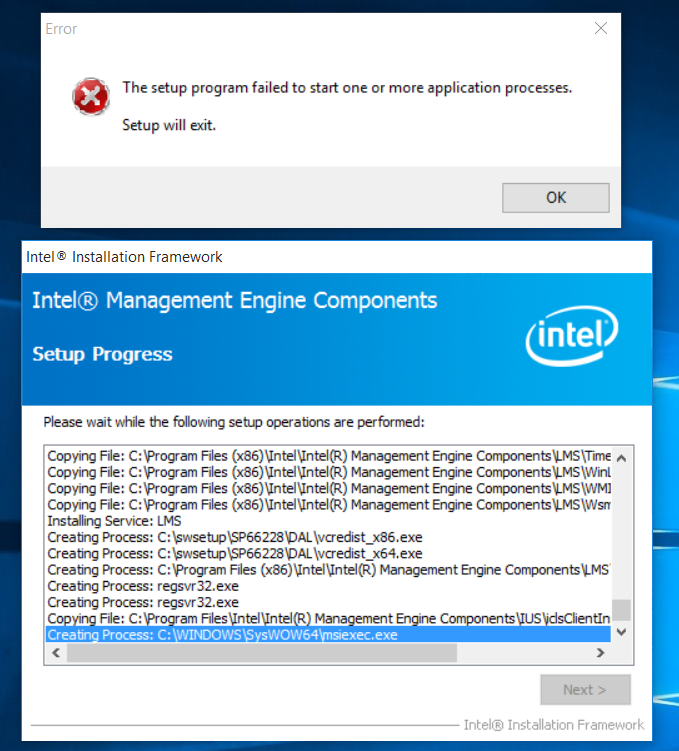
Thank you for the solution. I saw that HP has also provided the same solution which you have suggested. But I am having problem doing that also. Whenever, I am installing the '[Version 9.5.24.1790 1.5M (http://ftp.hp.com/pub/softpaq/sp66001-66500/sp6622) will work for most models.]', the following error occur at 'Creating process: C:\Windows\SysWOW64\msiexec.exe' and the installation terminates. Please help.
11-26-2015 02:26 AM
HP Recommended
Hi everyone - I am still using Windows 8.1, haven't upgraded to Windows 10 yet.
About a month ago I did an update of all the drivers on my laptop, and began facing the same issue mentioned in this thread - it wouldn't go to sleep properly (power button LED would remain glowing and I could hear the fans running but the screen was black).
I followed the solution of rolling back the Intel Management Engine Interface driver to an earlier version, and the sleep issue was solved. But it seemed to have led to a new problem: Blue Screen of Death with the error Driver_irql_not less_or equal. 
From what I've read, this usually happens when there is an incompatible / outdated driver in the system, so I updated the MEI driver again to the latest version (all other drivers were already up-to-date).
Now the sleep issue is back 
Has anyone else who used this method got a BSOD? If so, what's the fix??

Be alert for scammers posting fake support phone numbers and/or email addresses on the community.
If you think you have received a fake HP Support message, please report it to us by clicking on "Flag Post".
† The opinions expressed above are the personal opinions of the authors, not of HP. By using this site, you accept the Terms of Use and Rules of Participation.


Didn't find what you were looking for?
Ask the community
† The opinions expressed above are the personal opinions of the authors, not of HP. By using this site, you accept the <a href="https://www8.hp.com/us/en/terms-of-use.html" class="udrlinesmall">Terms of Use</a> and <a href="/t5/custom/page/page-id/hp.rulespage" class="udrlinesmall"> Rules of Participation</a>.