• ×
    Information
    Need Windows 11 help?
    Check documents on compatibility, FAQs, upgrade information and available fixes.
    Windows 11 Support Center.
  • post a message
  • ×
    Information
    Need Windows 11 help?
    Check documents on compatibility, FAQs, upgrade information and available fixes.
    Windows 11 Support Center.
  • post a message
Guidelines
Join the HP Community Solve‑a‑thon | Help Others & Share Your Solutions | Live on Zoom | 2:30 PM to 2:30 AM IST | Every Wednesday Click here to know more
HP Recommended
Microsoft Windows 10 (64-bit)

I switched to safe mode to fix an issue with malware/virus (OverldBuddies). Now I cannot get back to a normal restart. My laptop keeps restarting into safe mode. HELP!

1 REPLY 1
HP Recommended

@LoneTrekker, Welcome to HP Support Community!


To exit Safe Mode, open the System Configuration tool by opening the Run command (keyboard shortcut: Windows key + R) and typing msconfig then Ok. 2. Tap or click the Boot tab, uncheck the Safe boot box, hit Apply, and then O.


Disable automatic restart when Windows 10 or Windows 8 starts normally

  1. In Windows, search for and open View advanced system settings.

  2. In the Advanced tab, under Startup and Recovery, click Settings.

    Startup and Recovery Settings in the System Properties window

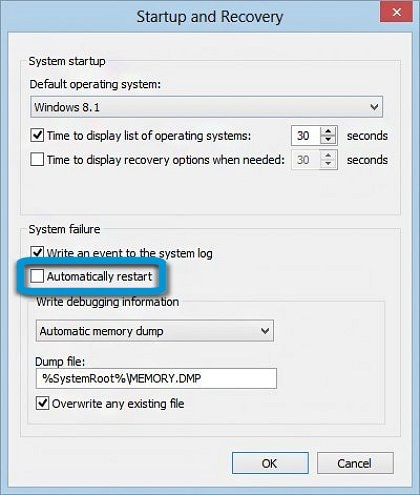
  3. Under System Failure, remove the check mark next to Automatically restart, then click OK.

    Automatically restart option unselected

  4. Restart the computer to apply the change.

Keep me posted for further assistance.


Please click “Accept as Solution” if you feel my post solved your issue, it will help others find the solution. Click the “Kudos/Thumbs Up" on the bottom right to say “Thanks” for helping!

TEJ1602
I am an HP Employee

† The opinions expressed above are the personal opinions of the authors, not of HP. By using this site, you accept the <a href="https://www8.hp.com/us/en/terms-of-use.html" class="udrlinesmall">Terms of Use</a> and <a href="/t5/custom/page/page-id/hp.rulespage" class="udrlinesmall"> Rules of Participation</a>.