• ×
    Information
    Need Windows 11 help?
    Check documents on compatibility, FAQs, upgrade information and available fixes.
    Windows 11 Support Center.
  • post a message
  • ×
    Information
    Need Windows 11 help?
    Check documents on compatibility, FAQs, upgrade information and available fixes.
    Windows 11 Support Center.
  • post a message
Guidelines
Do you need help resolving ACPI Errors ACPI\VEN_BOOT&DEV_0000 and ACPI\VEN_PRP&DEV_0001 on HP Chromebook G2? Click here for the troubleshooting steps.
HP Recommended
HP Pavilion Notebook - 15-ab121dx (ENERGY STAR)
Microsoft Windows 10 (64-bit)

WIN+V and power button give a cmos checksum invalid error 502.  I have changed the CMOS battery, have new main battery, load the latest BIOS and reset BIOS to default setting but still getting the error.  Also Windows 10 will not boot if TPM is available. Load OK if TPM is hidden.  Been working on this for awhile but with no success.

3 REPLIES 3
HP Recommended

@JL97327, Welcome to HP Support Community,


Thank you for posting your query; I’m here to help by guiding you through steps to resolve this issue


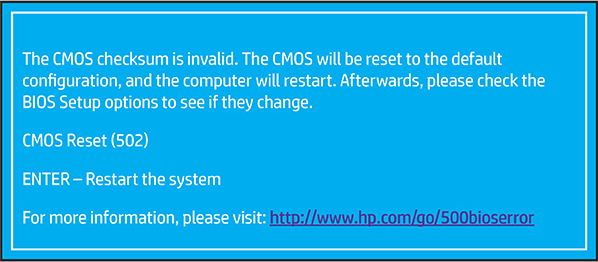
During the startup process, the system performs a checksum test of the BIOS. If the checksum is incorrect, the BIOS is assumed to be corrupt and the system installs a hidden copy of the BIOS to correct the problem, and the startup process continues. The following message displays for 15 seconds before the computer automatically reboots. You have the option of pressing enter to proceed without waiting 15 seconds.

Identifying the CMOS Checksum Error (502)


To resolve the CMOS Reset Error (502), follow this guide: HP PCs - 500, 501, or 502 error displays on a black screen | HP® Support


I hope this helps.

Please feel free to reply here if you have any questions or if you need further clarification on any of the steps. 


Take care and have a good day. 


Did we resolve the issue? If yes, please consider marking this post as "Accepted Solution" and click "Yes" to give us a helpful vote - your feedback keeps us going!


Regards,

Garp_Senchau
I am an HP Employee

HP Recommended

I have read through HP PCs - 500, 501, or 502 error displays on a black screen | HP® Support link many times and tried everything.  None has worked.  I believe that the CMOS is corrupted as the Bios has been updated to the latest version and the computer will not boot to windows if the TPM is not hidden.  The CMOS has been reset by removing the Battery for over thirty minutes.  As no one is able to give a possible fix to the many people that have asked I am going to assumed that this is unrecoverable.  I will keep looking for a solution though. 

HP Recommended

Hey @JL97327


Thanks for reaching out! Since the issue remains unresolved, I suggest contacting our phone/chat support team for personalized assistance. They can provide one-on-one help and may even be able to work their remote assistance magic to fix the problem.


Note: There might be a nominal charge for the service they provide.


Regards,

Garp_Senchau
I am an HP Employee

† The opinions expressed above are the personal opinions of the authors, not of HP. By using this site, you accept the <a href="https://www8.hp.com/us/en/terms-of-use.html" class="udrlinesmall">Terms of Use</a> and <a href="/t5/custom/page/page-id/hp.rulespage" class="udrlinesmall"> Rules of Participation</a>.