
-
×InformationNeed Windows 11 help?Check documents on compatibility, FAQs, upgrade information and available fixes.
Windows 11 Support Center. -
-
×InformationNeed Windows 11 help?Check documents on compatibility, FAQs, upgrade information and available fixes.
Windows 11 Support Center. -
- HP Community
- Notebooks
- Notebook Boot and Lockup
- Re: Windows 10 will not shut down completely? Power light st...

Create an account on the HP Community to personalize your profile and ask a question
Your account also allows you to connect with HP support faster, access a personal dashboard to manage all of your devices in one place, view warranty information, case status and more.

It has been a while since anyone has replied. Simply ask a new question if you would like to start the discussion again.

08-16-2015 04:47 PM - edited 08-16-2015 04:48 PM
 HP Recommended
Yup just did the update as well,still having the same issues with shut down. One thing I have found and i know others as well is trying to shut down after having my laptop on all day is when I see the problem all the time. If I use it for a short period of time and shut down it works fine.
08-17-2015 06:39 AM
HP Recommended
Yeah last week they released patches on tuesday as well as friday so I'm guessing they have increased their frequency to kill as many bugs as possible in the initial launch phase and get as big a customer base as possible.
****Click the Thumb icon to say thanks****
****Please mark Accept As Solution if it solves your problem****
****Please mark Accept As Solution if it solves your problem****
08-17-2015 08:46 AM
HP Recommended
We have absolutely no idea when MS will release their patch. And speaking about patch, they can't patch it until Intel updates their driver. The issue is caused by the "Intel Management Engine Interface" driver, especially for those who have done a clean install of Windows 10. For users who have upgraded from Windows 8.1 to Windows 10, but via the media creation tool, they have an older version of that driver already installed, which is not getting updated, when they upgrade using this media creation tool. Hence those users are not facing any issues.
But users who after claiming their free Windows 10, go for a clean install face this issue because as no version of that driver is installed, so the Forceful Automatic Update system is installing the latest version of Intel Management Engine Inteface driver which is causing the issue. The version causing issues is of v.11.xxxx. For them, it is recommended to uninstall that driver from Control Panel-->Device Manager-->Syatem Devices-->Intel Management Engine Interface, and then uninstall it, it will require a restart, then download an older version of that driver, preferably of v.9.xx , install it, which again will require a restart. And then you are all set.
It is recommended that you follow the above mentioned step, until Intel rectifies their errors in their upcoming updated version of the driver. And MS can't fix this until Intel rectifies their drivers. And yes, this is why MS is silent on this issue and this is not a smal issue, almost all laptop users are facing this issue. Its just that MS can stop giving users that update, but for those who are already suffering through this, get that new driver uninstalled and an older version installed, and then your shutdown/reboot/sleep issues are gone.
08-17-2015 10:09 AM - edited 08-17-2015 12:11 PM
HP Recommended
I rolled back my intel management engine interface to the one i had on 8.1 which was v9.5.xx and the problem still persists 😕
UPDATE: Problem Solved 🙂
****Click the Thumb icon to say thanks****
****Please mark Accept As Solution if it solves your problem****
****Please mark Accept As Solution if it solves your problem****
08-17-2015 10:12 AM - edited 08-17-2015 12:10 PM
HP Recommended
And yeah the reboot was totally unaffected and still is. And the shutdown/sleep is also normal if it is executed within 2-3 minutes of turning on the laptop.
****Click the Thumb icon to say thanks****
****Please mark Accept As Solution if it solves your problem****
****Please mark Accept As Solution if it solves your problem****
08-17-2015 11:22 AM
HP Recommended
@matio wrote:yup I have the 9 x drivers also and still have the same issue as I posted. My upgrade was through windows update so my interface driver stayed the same. Was hopefull though!
User upgrading through Windows update are reporting their certain drivers getting updated in the process, but users updating via media creation tool, wherein it asks, Help Windows improve your system by updating softwares..........something like that(I dnt remember, because I have done a clean installation from the iso), and if they deselect that, then their version remains the same. Well still, please check your driver version as below:
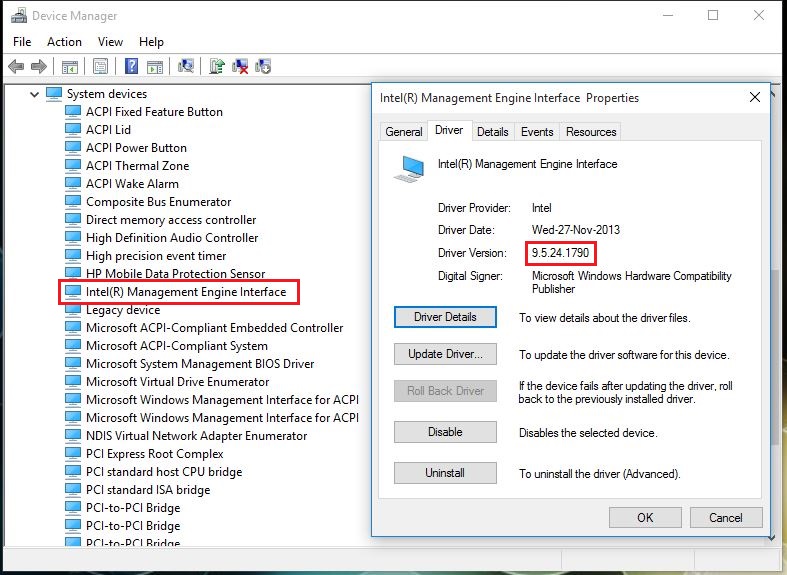
For me, it is 9.xxx and everything is working fine after i downgraded that driver. And its not just me, but hundreds of users are posting success after downgrading that particular driver from v.11 which Windows update installs it by default. So please check that version. Meanwhile, it is also suggested that you due to un-stability of the new releases of Intel drivers, install the Windows 8.1 version of Intel related drivers in Windows 10, and avoid the installation of "Intel Rapid Storage" driver(well, I have that installed still not having any issues, but i have Windows 8.1 version though).
But users are reporting to have succeeded just by downgrading "Intel Management Engine Interface" driver, only.

Be alert for scammers posting fake support phone numbers and/or email addresses on the community.
If you think you have received a fake HP Support message, please report it to us by clicking on "Flag Post".
† The opinions expressed above are the personal opinions of the authors, not of HP. By using this site, you accept the Terms of Use and Rules of Participation.


Didn't find what you were looking for?
Ask the community
† The opinions expressed above are the personal opinions of the authors, not of HP. By using this site, you accept the <a href="https://www8.hp.com/us/en/terms-of-use.html" class="udrlinesmall">Terms of Use</a> and <a href="/t5/custom/page/page-id/hp.rulespage" class="udrlinesmall"> Rules of Participation</a>.