-
×InformationNeed Windows 11 help?Check documents on compatibility, FAQs, upgrade information and available fixes.
Windows 11 Support Center. -

-
×InformationNeed Windows 11 help?Check documents on compatibility, FAQs, upgrade information and available fixes.
Windows 11 Support Center. -
- HP Community
- Notebooks
- Notebook Boot and Lockup
- getting freezed when left untouched

Create an account on the HP Community to personalize your profile and ask a question
07-22-2019 04:01 AM
when kept untouched, only the power key lights keeps on and nothing else works, where it should have gone to sleep and should wake up on pressing any key, but i have to keep pressing the power key for a few seconds and restart my computer. please help!!
07-24-2019 01:28 PM - edited 07-24-2019 02:51 PM
Thank you for posting your query on HP Community,
Let's try to run an extensive system test from F2 and check if the hardware components on your PC are functioning correctly.
1. Hold the power button for at least five seconds to turn off the computer.
2. Turn on the computer and immediately press Esc repeatedly, about once every second.
When the menu appears, press the F2 key.
3. On the HP PC Hardware Diagnostics (UEFI) main menu, click System Tests.
4. Click Extensive Test.
5. Click Run once, or Loop until error.
While the test is running, the time remaining and test result for each component are
shown on the screen.
6. If a component fails a test, write down the failure ID (24-digit code) so you have it
available when you contact HP Customer Support. The information is also available in
Test Logs on the main menu.
Refer this article to know more information about running system diagnostics on your PC. Click Here
Depending on the test results, If the test fails which would clearly indicate a possible hardware failure with the notebook.
If the test passes, I would suggest here is to update the Bios, Chipset and graphics card drivers on your notebook. You can try to update either using HP support website, using this link or download it using HP support assistant.
I suggest you download and run the HP Support Assistant from this Link: https://www8.hp.com/us/en/campaigns/hpsupportassistant/hpsupport.html?jumpid=va_r602_us/en/any/psg/p...
HPSA will automatically search for all the latest drivers for your Notebook
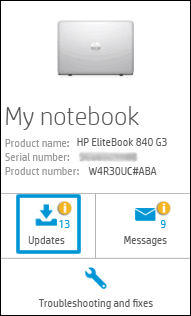
Click My devices in the top menu, and then click Updates in the My PC or My notebook pane.

Click Check for updates and messages to scan for new updates.

Review the list of updates. Updates with a yellow information icon are recommended. Updates with a blue information icon are optional.
Click the update name for a description, version number, and file size.
Select the box next to any updates you want to install, and then click Download and install.
Also ensure Windows is up to date.
Select the Start button, and then go to Settings > Update & security > Windows Update , and select Check for updates. If Windows Update says your device is up to date, you have all the updates that are currently available
Keep me posted how it goes
Thank you and have a wonderful weekend
If the information I've provided was helpful, give us some reinforcement by clicking the "Solution Accepted" on this Post and it will also help other community members with similar issue.
Jeet_Singh
I am an HP Employee