• ×
    Information
    Need Windows 11 help?
    Check documents on compatibility, FAQs, upgrade information and available fixes.
    Windows 11 Support Center.
  • post a message
  • ×
    Information
    Need Windows 11 help?
    Check documents on compatibility, FAQs, upgrade information and available fixes.
    Windows 11 Support Center.
  • post a message
Guidelines
Seize the moment! nominate yourself or a tech enthusiast you admire & join the HP Community Experts!
HP Recommended
ProBook 6455b
Microsoft Windows 8 (32-bit)

A disk read error occured 

3 REPLIES 3
HP Recommended

@Xray2 

This is a likely indication that the hard drive is dying.

If your PC is new enough to support UEFI, you can use these steps to test the hard drive: http://support.hp.com/us-en/document/c00439024

If not, you have to follow these steps:
1) Press Esc key repeatedly, several times a second, while rebooting the laptop. Do NOT hold the key down, just press it over and over.
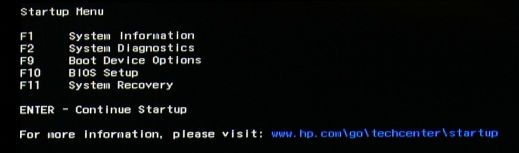
2) Eventually, you will see an HP Startup Menu -- that will look similar to the image below ...
HP Startup Menu.jpg
3) press the Function key for testing the hard drive (usually F2) and let it run.

Please report back the test results.


I am a volunteer and I do not work for, nor represent, HP
HP Recommended

HD is okay

HP Recommended

@Xray2 

Then, the filesystem is corrupted -- and the disk test does not check the filesystem, only the hardware.

You have to run  CHKDSK to check the filesystem.

Here are the details:  https://www.online-tech-tips.com/windows-10/check-disk-and-system-files-in-windows-8-10/


I am a volunteer and I do not work for, nor represent, HP
† The opinions expressed above are the personal opinions of the authors, not of HP. By using this site, you accept the <a href="https://www8.hp.com/us/en/terms-of-use.html" class="udrlinesmall">Terms of Use</a> and <a href="/t5/custom/page/page-id/hp.rulespage" class="udrlinesmall"> Rules of Participation</a>.