
-
×InformationNeed Windows 11 help?Check documents on compatibility, FAQs, upgrade information and available fixes.
Windows 11 Support Center. -
-
×InformationNeed Windows 11 help?Check documents on compatibility, FAQs, upgrade information and available fixes.
Windows 11 Support Center. -
- HP Community
- Notebooks
- Business Notebooks
- My USB Type-C port not working

Create an account on the HP Community to personalize your profile and ask a question
Your account also allows you to connect with HP support faster, access a personal dashboard to manage all of your devices in one place, view warranty information, case status and more.

It has been a while since anyone has replied. Simply ask a new question if you would like to start the discussion again.

01-12-2019 10:04 AM
 HP Recommended
Product: HP Spectre x360 Convertible 15-df0xxx
Operating System: Microsoft Windows 10 (64-bit)
My computer have two USB Type-C ports and the corner USB Type-C port is not working, I don't know what happen but the device manager show that all the ports are normal
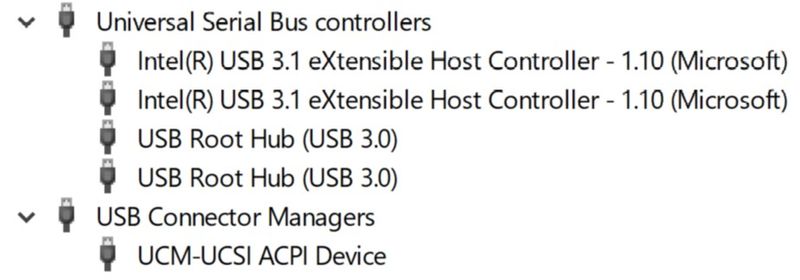
Solved! Go to Solution.
1 ACCEPTED SOLUTION
13 REPLIES 13



01-13-2019 05:35 AM - edited 01-13-2019 05:40 AM
HP Recommended
Ok it is not a hardware issue. Right click on each usb "hub" in device manager select properties and events and look at the event log. You may want to try uninstalling each device from device manager, reboot and let the driver reload. This article has some good suggestions but ignore the part about downloading the TweakBit Driver Updater. You do not need that.
https://windowsreport.com/usb-not-working-windows-10/



07-05-2019 07:22 AM
HP Recommended
Hey there, Thanks for this solution - it worked for me, for about 10 minutes. Do you happen to know what could be causing the issue? Reliably, when I drain the power, the port works for around 10 minutes and then goes out again.
10-04-2019 02:17 PM - edited 10-04-2019 02:19 PM
HP Recommended
Thanks for the post. Simple, no nonsense and it worked. I was getting really worried as both c ports stopped working and I needed my HP USB-C Travel Docking Station. Really appreciate the share. Have spent a few weeks off and on trying to address this and was really stressed out now that both had stopped.

Be alert for scammers posting fake support phone numbers and/or email addresses on the community.
If you think you have received a fake HP Support message, please report it to us by clicking on "Flag Post".
† The opinions expressed above are the personal opinions of the authors, not of HP. By using this site, you accept the Terms of Use and Rules of Participation.


Didn't find what you were looking for?
Ask the community
† The opinions expressed above are the personal opinions of the authors, not of HP. By using this site, you accept the <a href="https://www8.hp.com/us/en/terms-of-use.html" class="udrlinesmall">Terms of Use</a> and <a href="/t5/custom/page/page-id/hp.rulespage" class="udrlinesmall"> Rules of Participation</a>.