• ×
    Information
    Need Windows 11 help?
    Check documents on compatibility, FAQs, upgrade information and available fixes.
    Windows 11 Support Center.
  • post a message
  • ×
    Information
    Need Windows 11 help?
    Check documents on compatibility, FAQs, upgrade information and available fixes.
    Windows 11 Support Center.
  • post a message
Guidelines
Seize the moment! nominate yourself or a tech enthusiast you admire & join the HP Community Experts!
Archived This topic has been archived. Information and links in this thread may no longer be available or relevant. If you have a question create a new topic by clicking here and select the appropriate board.

HP Recommended
Spectre 13-w020tu
Microsoft Windows 10 (64-bit)

I vaguely remember disabling my webcam in the BIOS when I first got it. There have been several bios updates since then and I can no longer find that setting.
It doesn't appear in the Device Manager even when I un-hide everything.


As you can imagine I need it now.


Any assistance is appreciated.

5 REPLIES 5
HP Recommended

I don't remember ever seeing the ability to disable a webcam in BIOS.


Try installing one of the webcam drivers from the  product support list drivers at the link below this line. See the available Driver Add-Ons.


https://support.hp.com/us-en/drivers/selfservice/hp-spectre-13-w000-x360-convertible-pc/12499178/mod...


I am a volunteer forum member. If my suggestion helped you solve your issue, help others by marking that post as the accepted solution. Say thanks by clicking on the Yes button next to the "was this reply helpful?"


HP Recommended

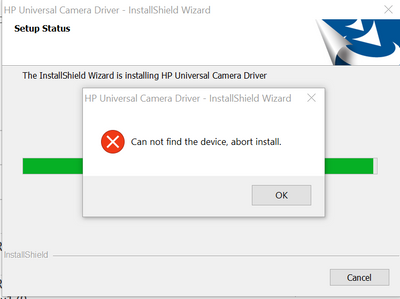
Thank you but that didn't work.

Stefwill_0-1586408991661.png


HP Recommended

I can't really remember a setting in BIOS to disable Webcam but you might try resetting BIOS to Default settings to see if that switches it back. Usually by tapping F5 key once inside BIOS setup. Save & Exit.

**Click Accept as Solution on a Reply that solves your issue**
***Click the "YES" button if you think this response was helpful.***

HP Recommended

I have reset the Bios and Factory reset Windows 10.

still no joy

HP Recommended

im having the same issues recently on a couple of different laptops, the camera seems to have disappeared from the BIOS completely, did you get any further with this? we have had a few instances where the newest bios and running HPs Image assistant tool to update all drivers has resolved some of these issues. (corporate laptops but could be worth trying running the equivalent to see if there are any other drivers that need updated?

Archived This topic has been archived. Information and links in this thread may no longer be available or relevant. If you have a question create a new topic by clicking here and select the appropriate board.
† The opinions expressed above are the personal opinions of the authors, not of HP. By using this site, you accept the <a href="https://www8.hp.com/us/en/terms-of-use.html" class="udrlinesmall">Terms of Use</a> and <a href="/t5/custom/page/page-id/hp.rulespage" class="udrlinesmall"> Rules of Participation</a>.