• ×
    Information
    Need Windows 11 help?
    Check documents on compatibility, FAQs, upgrade information and available fixes.
    Windows 11 Support Center.
  • post a message
  • ×
    Information
    Need Windows 11 help?
    Check documents on compatibility, FAQs, upgrade information and available fixes.
    Windows 11 Support Center.
  • post a message
Guidelines
Join the HP Community Solve‑a‑thon | Help Others & Share Your Solutions | Live on Zoom | 2:30 PM to 2:30 AM IST | Every Wednesday Click here to know more
Check out our WINDOWS 11 Support Center info about: OPTIMIZATION, KNOWN ISSUES, FAQs, VIDEOS AND MORE.
HP Recommended

Currently i was changing my HDD from my PC to a new SSD with Linux and Wndows 11 dual booted, I ran to a problem where the device would just shutdown with no warning and doesnt boot into either of the OS's. After some investigation i found out I had to access the secure boot option and disable it to my surprise it had a BIOS Administrator password. The machine is a Second hand HP Elitebook 801 G2. Whatever combination i tried writing down it wouldn't burge and sometimes i would end up being locked out. After running about to find ways i can use to reset the password, ChatGPT suggested to contact HP Support which will send to me a .bin file capable of wiping the present password. I don't know if such a thing exists but i haven't been  lucky to get the .bin. Please Help on This


P.S Help on this


1 REPLY 1
HP Recommended

Hi @BLAKK-KIDD,


Welcome to the HP Support Community.


Thank you for posting your query.


I am sorry to hear that you are facing issues to reset or bypass a BIOS administrator password on an HP EliteBook 800 G2 series. Since you bought the laptop second-hand, the previous owner likely set the password, I would request you to check with the previous owner. Also, try the below step which might work.


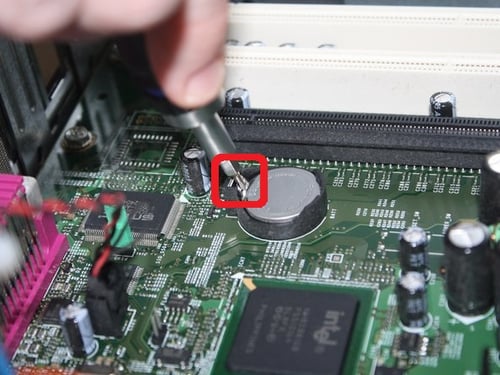
Remove CMOS Battery

  • Shut down the PC.
  • Unplug power cable completely.
  • Press power button for 10 seconds (discharge residual power).
  • Open the CPU cabinet.
  • Locate the CMOS battery (CR2032 coin cell) on motherboard.
  • Carefully remove it.
  • Wait 5–15 minutes.
  • Reinsert the battery.
  • Close cabinet and power on.


https://support.redbirdflight.com/hs-fs/hubfs/CMOS%20Battery%20Tab-jpg.jpeg?name=CMOS+Battery+Tab-jpg.jpeg&width=500


Take care and have an amazing day!


Did we resolve the issue? If yes, please consider marking this post as "Accepted Solution" and click "Yes" to give us a helpful vote - your feedback keeps us going!


Regards

Pallipurath.

I'm an HP Employee.


If this reply helped resolve your issue, please select the Accept as Solution as it helps others in the community quickly find the answer they’re looking for.


And if you found this reply helpful, clicking Yes below is a great way to let us know we’re providing the support you need, as it encourages us to keep improving and sharing helpful guidance.

† The opinions expressed above are the personal opinions of the authors, not of HP. By using this site, you accept the <a href="https://www8.hp.com/us/en/terms-of-use.html" class="udrlinesmall">Terms of Use</a> and <a href="/t5/custom/page/page-id/hp.rulespage" class="udrlinesmall"> Rules of Participation</a>.