• ×
    Information
    Need Windows 11 help?
    Check documents on compatibility, FAQs, upgrade information and available fixes.
    Windows 11 Support Center.
  • post a message
  • ×
    Information
    Need Windows 11 help?
    Check documents on compatibility, FAQs, upgrade information and available fixes.
    Windows 11 Support Center.
  • post a message
Guidelines
Join the HP Community Solve‑a‑thon | Help Others & Share Your Solutions | Live on Zoom | 2:30 PM to 2:30 AM IST | Every Wednesday Click here to know more
Check out our WINDOWS 11 Support Center info about: OPTIMIZATION, KNOWN ISSUES, FAQs, VIDEOS AND MORE.
HP Recommended

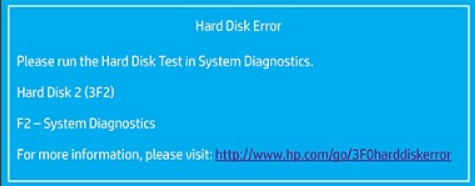
Boot device not found

Hard Disk (3f0) 

F2 system Diagnostic 

1 REPLY 1
HP Recommended

@Olafowowe, Welcome to the HP Support Community!  


Thanks for reaching out about your query regarding Hard Disk Error 3F0: Boot Device Not Found! 

We're thrilled to have the opportunity to assist you and provide a solution.  


The Hard Disk Error 3F0, also known as Boot Device Not Found, is a common issue encountered when the computer cannot detect a bootable operating system. Here are the steps to troubleshoot and resolve this error:


Run the Hard Disk Test in System Diagnostics:

  • Turn off the computer, and then turn it back on while repeatedly pressing the Esc key to access the startup menu.
  • Press F2 to enter the System Diagnostics menu and select "Component Tests."
  • Choose "Storage" and then "Quick Test" to start the diagnostics.

Check Cables and Connections: Ensure that all hard drive cables are securely connected to the motherboard and the power supply. Reseat them if necessary.

Update the BIOS: Sometimes updating the BIOS can resolve the issue. Visit the HP support website for instructions specific to your model to update the BIOS.

Restore BIOS Default Settings:

  • Turn off the computer, and then turn it back on while repeatedly pressing F10 to enter the BIOS Setup menu.
  • Press F9 to load the BIOS Setup Default settings, then F10 to Save and Exit.

Reinstall Windows:

  • If diagnostics do not resolve the issue, you may need to reinstall Windows. This can be done via the Windows Recovery Environment (F11) or the HP Cloud Recovery Tool.  

Hope this helps! 

Take care, and have an amazing day!  


Did we resolve the issue? If yes, Please consider marking this post as "Accepted Solution" and click "Yes" to give us a helpful vote - your feedback keeps us going!  


Regards, 

ZOEY7886
I am an HP Employee

† The opinions expressed above are the personal opinions of the authors, not of HP. By using this site, you accept the <a href="https://www8.hp.com/us/en/terms-of-use.html" class="udrlinesmall">Terms of Use</a> and <a href="/t5/custom/page/page-id/hp.rulespage" class="udrlinesmall"> Rules of Participation</a>.