• ×
    Information
    Need Windows 11 help?
    Check documents on compatibility, FAQs, upgrade information and available fixes.
    Windows 11 Support Center.
  • post a message
  • ×
    Information
    Need Windows 11 help?
    Check documents on compatibility, FAQs, upgrade information and available fixes.
    Windows 11 Support Center.
  • post a message
Guidelines
Join the HP Community Solve‑a‑thon | Help Others & Share Your Solutions | Live on Zoom | 2:30 PM to 2:30 AM IST | Every Wednesday Click here to know more
Check out our WINDOWS 11 Support Center info about: OPTIMIZATION, KNOWN ISSUES, FAQs, VIDEOS AND MORE.
HP Recommended
Pavilion 15 Laptop PC
Microsoft Windows 10 (32-bit)

Try to do Initial Setup< It wants me to Sync my phone to the Laptop which will change my internet to Edge instead of Google, it will not let me skip it.

1 REPLY 1
HP Recommended

@Dwayne1963

Thank you for posting on the HP Support Community.


Don't worry as I'll be glad to help, Firstly disconnect the phone and restart your computer 

  1. Press the power button to turn on the computer. During the setup process, Windows 10 might take a long time to process an item without visual feedback on the screen to indicate progress. This is normal.

     CAUTION: To avoid damaging the data on the computer, do not restart your computer during the setup process.
  2. After the HP logo, the Let's start with region. Is this correct? screen displays. Select your country or region from the list, and then click Yes.

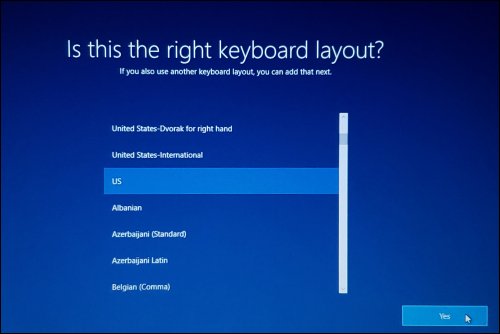
  3. The Is this the right keyboard layout? screen displays. Select the desired keyboard layout, and then click Yes.

    Selecting the keyboard layout

  4. On the Do you want to add a second keyboard layout? screen, you can either follow the instructions for adding another keyboard layout or click Skip.

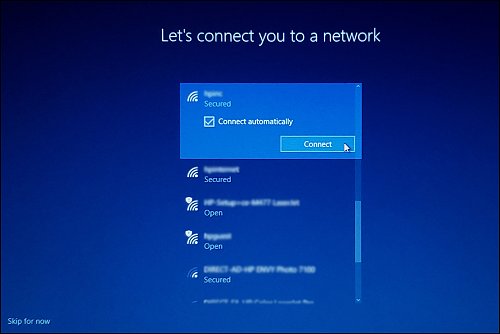
  5. On the Let's connect you to a network screen, select from the available networks, type in your user name and password if necessary, and then click Connect.

    Connecting to a network

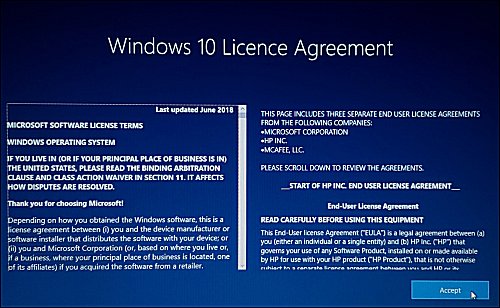
  6. After a few introductory setup screens that require no action, the Windows 10 License Agreement screen displays. After reading the license agreement, to proceed, click Accept to continue.

    Windows 10 license agreement

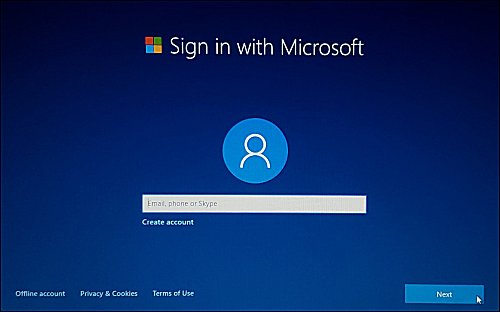
  7. After the license agreement, the Sign in with Microsoft screen displays. Sign in with your Microsoft account or click Create account and follow the prompts to create a new Microsoft account.

    Sign in with Microsoft

  8. After signing in, the following setup screens display. Follow the on-screen instructions to customize Windows.

    • Link your Android or iPhone to this PC

    • Protect your files with OneDrive

    • Set up your Office

    • Make Cortana your personal assistant?

    • Do more across devices with activity history

    • Choose privacy settings for your device

  9. On the registration screen, type your personal information, and then click Next.

    Putting in your information to register

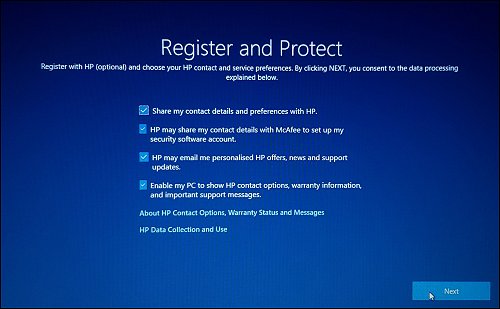
    On the Register and Protect screen, select your preferred privacy settings, and then click Next.

    Making the desired selection in Register and Protect

  10. Read any introductory screens describing the features of your computer, make selections when prompted, and then click Next up on completing each.

    You are now done with the initial setup process.

Hope this helps! Keep me posted for further assistance.
Please click “
Accept as Solution” if you feel my post solved your issue, it will help others find the solution.


ECHO_LAKE
I am an HP Employee

† The opinions expressed above are the personal opinions of the authors, not of HP. By using this site, you accept the <a href="https://www8.hp.com/us/en/terms-of-use.html" class="udrlinesmall">Terms of Use</a> and <a href="/t5/custom/page/page-id/hp.rulespage" class="udrlinesmall"> Rules of Participation</a>.