• ×
    Information
    Need Windows 11 help?
    Check documents on compatibility, FAQs, upgrade information and available fixes.
    Windows 11 Support Center.
  • post a message
  • ×
    Information
    Need Windows 11 help?
    Check documents on compatibility, FAQs, upgrade information and available fixes.
    Windows 11 Support Center.
  • post a message
Guidelines
Seize the moment! nominate yourself or a tech enthusiast you admire & join the HP Community Experts!
Check out our WINDOWS 11 Support Center info about: OPTIMIZATION, KNOWN ISSUES, FAQs, VIDEOS AND MORE.
HP Recommended
Stream laptop 14

I was given a stream 14 laptop but dont know the password i am trying to factory reset it and i got it until it said i needed the optaine its not there at all what do i do? Im trying to get this set up as soon as possible for a gift

1 REPLY 1
HP Recommended

Hello @Thetragician666 


Do you talk about the Windows password ?


Based on best security practice and because you don't know the password, you should completely erase the content of storage device (format it) and then reinstall Windows (or another OS) from scratch. By doing this, you will also gain some free space because the recovery partition will be gone.


Here are instructions >> 


Windows reinstallation / clean installation :


- You can directly download Windows 10 ISO from MS site or download >> Media creation tool from Microsoft site, create  installation USB device  and  proceed with clean installation/reinstallation.


Download:

>> https://www.microsoft.com/en-us/software-download/windows10ISO


Make sure you select the proper version (64 bit / Home) if asked.


Media Creation tool will always provide you with the latest Windows version/build - now 1903 - May Update.


- When download completes, you will need to write  the ISO image and boot from a bootable media. You will need a blank USB pendrive (min 8 GB capacity). Use the media creation tool


When ready with the USB drive:


Please, shutdown the computer using the power button.

Insert the Windows USB thumdrive prepared previously

Power on the PC.

As soon as you press the power-on button, start hitting the Esc button repeatedly (like tap-tap-tap).

This should open a HP Startup Menu


Choose F9 to open Boot options. Select the USB thumb drive as a boot option.


- Follow the on-screen instructions to install Windows 10. Perform clean installation/custom installation (not repair).

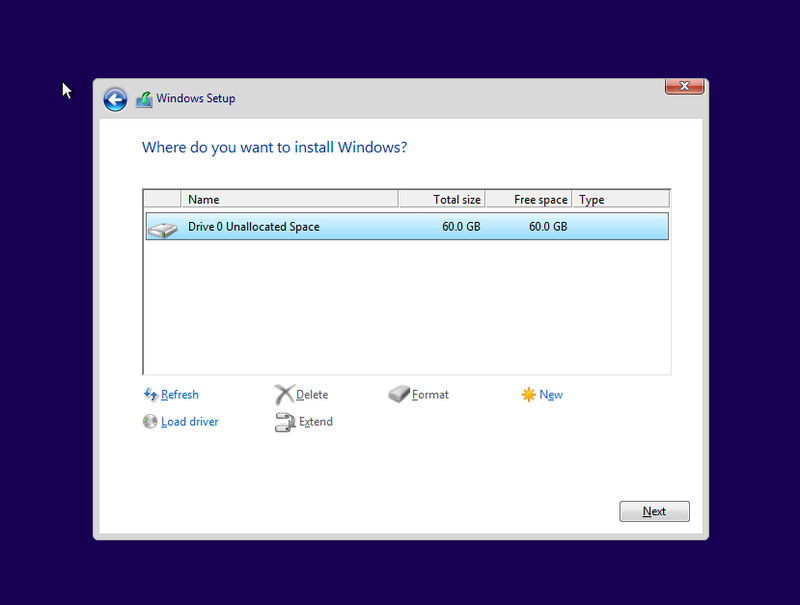
Delete all existing partitions and install Windows on Disc 0 Unallocated space


4.PNG


- After successful Windows installation, connect to a wi-fi network and update Windows immediately - this will update Windows but it will also install drivers for this device to enable/active the hardware


- Make sure Windows is Activated by going to Start > Settings > Update & Security > Windows Activation


- You may wish to stop some of the Windows Telemetry by using free tools such as Spybot AntiBeacon or DWS Lite


Hope this works for you. Let me know how it goes and if this helped.


Your FEEDBACK is important. Use the interactive buttons below and let me know if the post helps ;
*** HP employee *** I express personal opinion only *** Joined the Community in 2013
† The opinions expressed above are the personal opinions of the authors, not of HP. By using this site, you accept the <a href="https://www8.hp.com/us/en/terms-of-use.html" class="udrlinesmall">Terms of Use</a> and <a href="/t5/custom/page/page-id/hp.rulespage" class="udrlinesmall"> Rules of Participation</a>.