• ×
    Information
    Need Windows 11 help?
    Check documents on compatibility, FAQs, upgrade information and available fixes.
    Windows 11 Support Center.
  • post a message
  • ×
    Information
    Need Windows 11 help?
    Check documents on compatibility, FAQs, upgrade information and available fixes.
    Windows 11 Support Center.
  • post a message
Guidelines
Seize the moment! nominate yourself or a tech enthusiast you admire & join the HP Community Experts!
Check out our WINDOWS 11 Support Center info about: OPTIMIZATION, KNOWN ISSUES, FAQs, VIDEOS AND MORE.
HP Recommended
HP Envy13
Microsoft Windows 10 (64-bit)

My HP Envy 13 camera does not work on start up

1 REPLY 1
HP Recommended

@Madmax1632 Welcome to HP Forums!

To confirm, did this issue occur after any recent hardware or software changes? Any updates you've installed on the PC?

Does the webcam work after you start up the device? since you've mentioned that it doesn't work on startup, are you using it for facial login?


While you respond to that, please check if the webcam is detected in the device manager:

  1. In Windows, search for and open Device Manager.

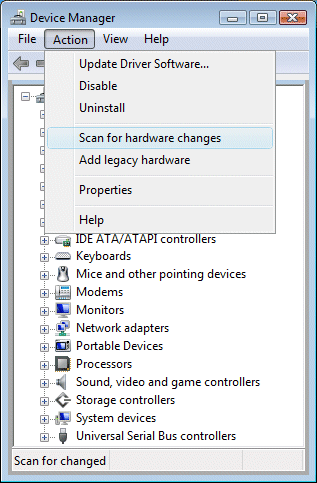
  2. If there is no Imaging devices category listed, select Action, then Scan for hardware changes.
     

    Image: Scan for hardware changes
     

  3. If Device Manager does not recognize the webcam after the scan, use Microsoft System Restore to go back to a time when the webcam was working properly.

    If problems persist, the webcam might have become unplugged internally, and the computer might require service to correct the issue.

Keep me posted, as I (Or a trusted colleague) shall follow-up on this case to ensure the concern has been addressed, 

And your device is up and running again, only in case you don't get back to us, first! 

That said, If the information I've provided was helpful, give us some reinforcement by clicking the solution and kudos buttons, 

That'll help us, and others see that we've got the answers!

Good Luck.

Riddle_Decipher
I am an HP Employee


Learning is a journey, not a destination.
Let's keep asking questions and growing together.
† The opinions expressed above are the personal opinions of the authors, not of HP. By using this site, you accept the <a href="https://www8.hp.com/us/en/terms-of-use.html" class="udrlinesmall">Terms of Use</a> and <a href="/t5/custom/page/page-id/hp.rulespage" class="udrlinesmall"> Rules of Participation</a>.