• ×
    Information
    Need Windows 11 help?
    Check documents on compatibility, FAQs, upgrade information and available fixes.
    Windows 11 Support Center.
  • post a message
  • ×
    Information
    Need Windows 11 help?
    Check documents on compatibility, FAQs, upgrade information and available fixes.
    Windows 11 Support Center.
  • post a message
Guidelines
Seize the moment! nominate yourself or a tech enthusiast you admire & join the HP Community Experts!
Check out our WINDOWS 11 Support Center info about: OPTIMIZATION, KNOWN ISSUES, FAQs, VIDEOS AND MORE.
HP Recommended
HP Pavilion - 17-ab200nd
Microsoft Windows 10 (64-bit)

Hello,


I’ve been attempting to factory reset my Pavilion for a week now, with new struggles every single attempt.


Every single time I attempt to reset my PC, it will allow me to start the “recovery”, then it goes up to around 35% and it suddenly shuts down, restarts my device and goes right back where I left off before selecting to reset. I have no clue as to what I am supposed to do to fix this issue as I cannot access anything except for the USB drive now; my laptop supposedly has “no hard drive”, this might possibly be because I am booting from my USB but I also don’t know how to boot from my internal drives anymore.


My main question; does anybody know how to fix this? I’m pulling out hairs here 😢

3 REPLIES 3
HP Recommended

@Raymono 

This is NOT a criticism directed at YOU, but I really wish folks would quit routinely doing Factory Resets in attempts to repair an ailing PC. Not only does it rarely fix the PC, if there is an underlying hardware issue with the PC, it will make matters worse by leaving the PC in an unusable state.

The HP Factory Reset function relies critically on the contents of the Recovery partition being intact. If those contents get corrupted, which can happen either due to hard drive failing or due to Win10 Upgrade from an older OS, the reset simply will not work.

To check for hard drive failing, if your PC is new enough to support UEFI, you can use these steps to test the hard drive: http://support.hp.com/us-en/document/c00439024

If not, you have to follow these steps:
1) Press Esc key repeatedly, several times a second, while rebooting the laptop. Do NOT hold the key down, just press it over and over.
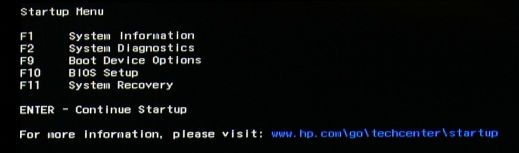
2) Eventually, you will see an HP Startup Menu -- that will look similar to the image below ...
HP Startup Menu.jpg
3) press the Function key for testing the hard drive (usually F2) and let it run.

Please report back the test results.


I am a volunteer and I do not work for, nor represent, HP
HP Recommended

E4AD1F2F-3B8C-4AF5-A42A-B4961569F05C.jpeg

The test had returned with a “Short DST Failed”


I understand what this means but this was not necessarily my question. I had no issues with my hardware prior to resetting my PC, I wanted to clean everything out and return to my original factory state.


What I am dealing with is the issue that I made a Recovery USB because(!) I was not “allowed” to reset my PC, and after an extreme amount of attempts and different methods, the Recovery USB was my last one. I’m now stuck in this (picture above) menu after removing my USB drive because(!) again, my PC does not allow me to factory reset. 


I ran multiple diagnostics on my hard drive to check if that was the issue prior to resetting my PC, it did not have an issue beforehand.

HP Recommended

@Raymono 

Sorry to say this, but a factory reset puts a LOT of stress on a drive -- as it not only completely reformats the drive, and recreates all the original partitions, it also recreates the OS installation, the drivers, and the HP utilities.  IF the drive is marginal, this can be enough to push it "over the edge" into failing status.


You would need to consider replacing the drive at this point.


I am a volunteer and I do not work for, nor represent, HP
† The opinions expressed above are the personal opinions of the authors, not of HP. By using this site, you accept the <a href="https://www8.hp.com/us/en/terms-of-use.html" class="udrlinesmall">Terms of Use</a> and <a href="/t5/custom/page/page-id/hp.rulespage" class="udrlinesmall"> Rules of Participation</a>.