• ×
    Information
    Need Windows 11 help?
    Check documents on compatibility, FAQs, upgrade information and available fixes.
    Windows 11 Support Center.
  • post a message
  • ×
    Information
    Need Windows 11 help?
    Check documents on compatibility, FAQs, upgrade information and available fixes.
    Windows 11 Support Center.
  • post a message
Guidelines
Join the HP Community Solve‑a‑thon | Help Others & Share Your Solutions | Live on Zoom | 2:30 PM to 2:30 AM IST | Every Wednesday Click here to know more
Check out our WINDOWS 11 Support Center info about: OPTIMIZATION, KNOWN ISSUES, FAQs, VIDEOS AND MORE.
HP Recommended
Envy 360x

My laptop won’t open to the lock screen only the screensaver screen so I can’t get into the laptop. I simply just opened the laptop and it hasn’t opened and it is really slow that earlier when I tried to get hp support for the speakers that are uneven and keep going in and it, the application wouldn’t open and just stayed in the background. 

1 REPLY 1
HP Recommended

@Struggling-247_

Thank you for joining the HP Support Community


Let's Run a System Test and Depending on the test result, let's perform the troubleshooting steps.


Open the System Tests menu when Windows won't start.

  1. Hold the power button for at least five seconds to turn off the computer.

  2. Turn on the computer and immediately press Esc repeatedly, about once every second. When the menu appears, press the F2 key.

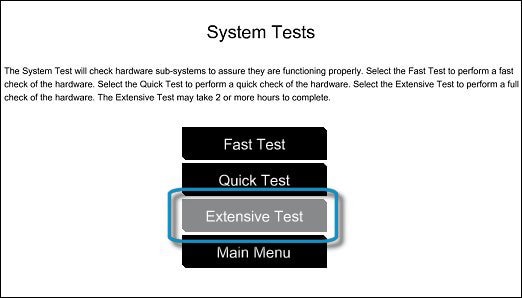
  3. On the main menu, click System Tests.

  4. Then click Extensive Test.

     Selecting the Extensive Test

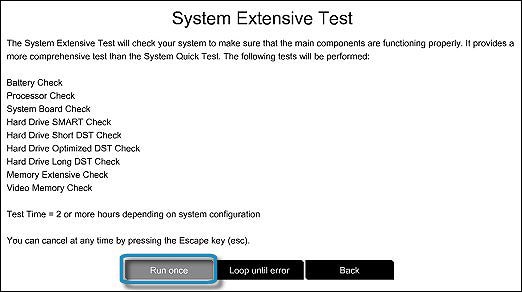
  5. Click Run once, or Loop until error.

    While the test is running, the time remaining and test result for each component displays on the screen. The test can take 2 or more hours to complete.

    Running the Extensive Test

  6. If a component fails a test, write down the failure ID (24-digit code) for when you contact HP Customer Support. The information is also available in Test Logs on the main menu.

Keep me posted with the teat result.

Have a great day!

Cheers:)

Raj1788
I am an HP Employee 

† The opinions expressed above are the personal opinions of the authors, not of HP. By using this site, you accept the <a href="https://www8.hp.com/us/en/terms-of-use.html" class="udrlinesmall">Terms of Use</a> and <a href="/t5/custom/page/page-id/hp.rulespage" class="udrlinesmall"> Rules of Participation</a>.