• ×
    Information
    Need Windows 11 help?
    Check documents on compatibility, FAQs, upgrade information and available fixes.
    Windows 11 Support Center.
  • post a message
  • ×
    Information
    Need Windows 11 help?
    Check documents on compatibility, FAQs, upgrade information and available fixes.
    Windows 11 Support Center.
  • post a message
Guidelines
Seize the moment! nominate yourself or a tech enthusiast you admire & join the HP Community Experts!
Check out our WINDOWS 11 Support Center info about: OPTIMIZATION, KNOWN ISSUES, FAQs, VIDEOS AND MORE.
HP Recommended
Pavilion X360 convertible

Whenever I want to type keys like Q, W, E, R, U, I, O, AND P. The f6 key will be showing red light and all these I mentioned will not function. 

3 REPLIES 3
HP Recommended

@Segben10


Good Day. A warm welcome to the HP community.


I reviewed the case regarding issues with the keyboard of the computer.


I will be delighted to assist you here.


Use HP PC Hardware Diagnostics to complete functional test of the keyboard and identify any problems with the hardware.

NOTE: 

Bluetooth devices are not currently supported.

  1. Download the latest version of HP PC Hardware Diagnostics.

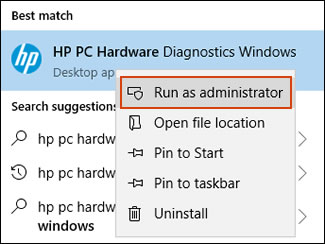
  2. In Windows, search for and right-click HP PC Hardware Diagnostics for Windows, and then select Run as administrator.

    Run HP PC Hardware Diagnostics Windows as an administrator

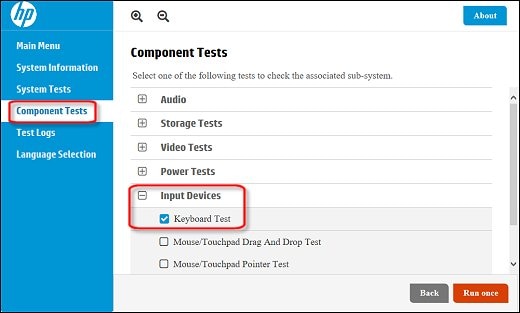
  3. Click Component Tests, click Input Devices, and then select the Keyboard Test.

    Running the Keyboard Test

  4. Click Run once to begin the test.

    The test ends when you complete the tasks or after 3 minutes.

For more information about using the HP PC Hardware Diagnostics for Windows, go to HP PCs - Testing for Hardware Failures.


Keep me posted. 🙂

Barachiel
I am an HP Employee

HP Recommended

I have tried it, it not working. It marked the button that are not responding with red colour. IMG_20190128_110126_955.jpg


HP Recommended

@Segben10


The test clearly says it is a hardware failure.


In this case, I'd request you to speak to the support team for further assistance. 🙂


1) Click on this link - http://www.hp.com/contacthp/ 

2) Select your product type below.

3) Enter the serial of your device. 

4) Select the country from the drop-down. 

5) Select the chat or get phone number options based on your preferences. 

Fill the web-form and proceed further.


Feel free to reach out if need any other assistance.


Thanks,

Barachiel
I am an HP Employee

† The opinions expressed above are the personal opinions of the authors, not of HP. By using this site, you accept the <a href="https://www8.hp.com/us/en/terms-of-use.html" class="udrlinesmall">Terms of Use</a> and <a href="/t5/custom/page/page-id/hp.rulespage" class="udrlinesmall"> Rules of Participation</a>.