• ×
    Information
    Need Windows 11 help?
    Check documents on compatibility, FAQs, upgrade information and available fixes.
    Windows 11 Support Center.
  • post a message
  • ×
    Information
    Need Windows 11 help?
    Check documents on compatibility, FAQs, upgrade information and available fixes.
    Windows 11 Support Center.
  • post a message
Guidelines
Join the HP Community Solve‑a‑thon | Help Others & Share Your Solutions | Live on Zoom | 2:30 PM to 2:30 AM IST | Every Wednesday Click here to know more
Check out our WINDOWS 11 Support Center info about: OPTIMIZATION, KNOWN ISSUES, FAQs, VIDEOS AND MORE.
HP Recommended
HP Pavilion 17 Notebook
Microsoft Windows 10 (64-bit)

I noticed since I upgraded my HP laptop from OS 8.1 to OS 10 it has not been shutting down.

I don`t know if there is anyone out there who has had the same experience.

What could be the probable cause of the problem and how can I resolve it?

1 REPLY 1
HP Recommended

Hallo @obahi 

Guten Morgen!


  • This seems to be somewhat common issue with Windows 8 or Windows 10. 
    It may be caused by a hardware problem (less likely) or
    Windows glitch (software or drivers not "shutting down" properly which prevents Windows from shutting down as a whole).


Here are a couple of things you may need to try :


Check Device Manager


1. Click on the Windows Start button, type and then open Device Manager
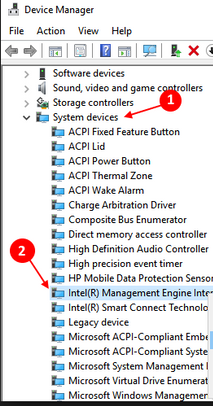
2. Locate System devices and expand the trail

Screenshot_2019-01-17_23-40-32.png


3. Locate and right click on "Intel (R) Management Engine Interface" then select Properties
4. Select Power management tap
5. And uncheck "Allow the computer to turn off this device to save power"
6. Save it and close it.


Turn off Fast Startup


  • Click on Start button
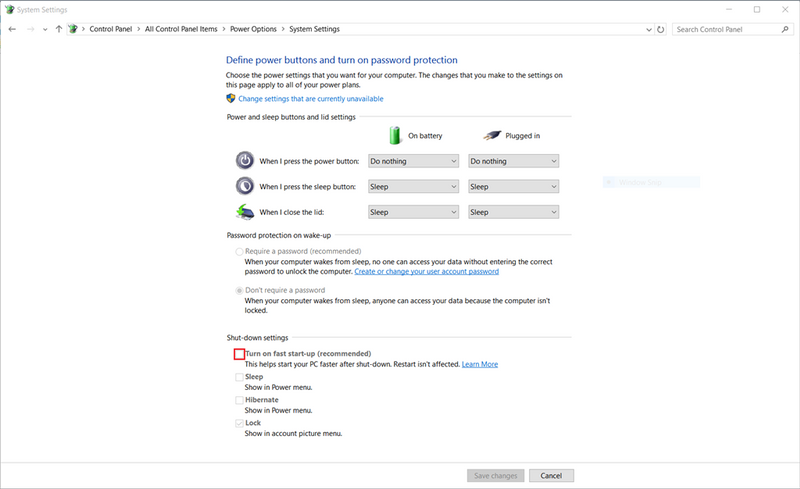
  • Type control.exe and Go to Control Panel > Power Options > Choose what the power button does
  • Click on “Change settings that are currently unavailable" and Uncheck "Turn on Fast Startup"
  • Make sure you press "Save changes" button


b805e667-b664-448f-afa2-ccf7d0282e9d.png


*****************  Check if the issue is resolved.  If it is, stop here...   If not, proceed with the steps below  ***************** 

Let me know how it goes


Try updating the BIOS


Scan your computer for viruses/malware/unwanted apps


.... Run the free ESET Online Scanner >> http://download.eset.com/special/eos/esetonlinescanner_enu.exe

Scan your PC for viruses, threats and unwanted/unsafe applications - remove if anything found.


.... Run AdwCleaner >>https://www.malwarebytes.com/adwcleaner/


Let me know how it goes

Your FEEDBACK is important. Use the interactive buttons below and let me know if the post helps ;
*** HP employee *** I express personal opinion only *** Joined the Community in 2013
† The opinions expressed above are the personal opinions of the authors, not of HP. By using this site, you accept the <a href="https://www8.hp.com/us/en/terms-of-use.html" class="udrlinesmall">Terms of Use</a> and <a href="/t5/custom/page/page-id/hp.rulespage" class="udrlinesmall"> Rules of Participation</a>.