• ×
    Information
    Need Windows 11 help?
    Check documents on compatibility, FAQs, upgrade information and available fixes.
    Windows 11 Support Center.
  • post a message
  • ×
    Information
    Need Windows 11 help?
    Check documents on compatibility, FAQs, upgrade information and available fixes.
    Windows 11 Support Center.
  • post a message
Guidelines
Seize the moment! nominate yourself or a tech enthusiast you admire & join the HP Community Experts!
Check out our WINDOWS 11 Support Center info about: OPTIMIZATION, KNOWN ISSUES, FAQs, VIDEOS AND MORE.
HP Recommended
E0L01UA#ABA
Microsoft Windows 8 (64-bit)
Just had a windows update now I'm getting BSOD and error code 0xc000007b, says "the operating system couldn't be loaded because a critical system driver is missing or contains errors" file: \Windows\System32\drivers\spaceport.sys

Can't even boot into safe mode. Pressing F11 for system recovery also doesnt work. Do I have any options or is my only choice to order a windows 8 recovery installation USB? Any help would be super appreciated

1 REPLY 1
HP Recommended

@Ozz630


Welcome to HP Support Forums. 🙂 


I understand that you have an HP ENVY m6-k010dx Sleekbook and post a Windows update, the laptop does not boot to Windows. There is a BSOD and an error code 0xc000007b. You've done a remarkable job performing the steps. 


As the laptop is not booting into the recovery manager or the safe mode, the only option is to reinstall Windows using the recovery media. However, before you do that, let us run a hardware test on the hard drive to ensure the hard drive is all good. 


I recommend you to perform the following steps to isolate the issue and arrive at a fix: 

  • Power off the laptop.
  • Remove the battery out. If the battery is integrated and does not have a latch to release it then leave the battery inside the laptop.
  • Disconnected AC adapter from the laptop.
  • Press and hold the power button for 15 seconds.
  • Reconnect the battery and plug the AC adapter.
  • Do not power on the laptop yet.

Let us check once last time if the recovery partition loads up:

  • Power on the laptop and immediately hit the f11 key repeatedly (7-8 times). 
  • This should load the recovery manager.

In case the recovery manager does not load then the following steps will help in running a hard drive test:

  • Power off the laptop.
  • Turn on the computer and immediately press Esc repeatedly, about once every second. When the menu appears, press the F2 key.

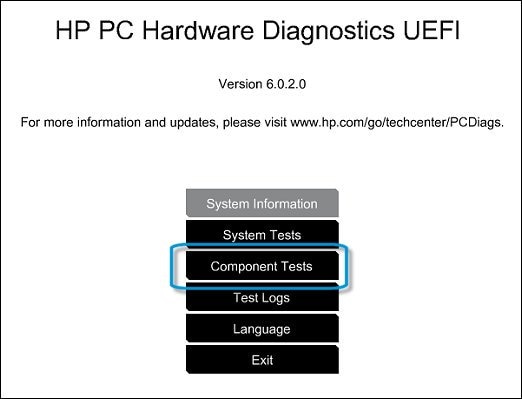
  • On the main menu, click Component Tests.


Figure : Selecting Component Tests from the main menu

Selecting Component Tests from the main menu

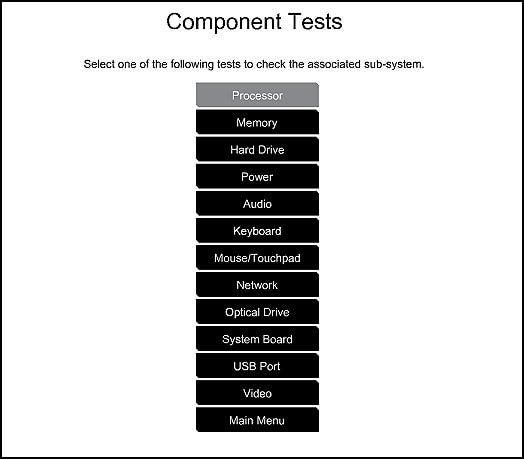
  • The Component Tests menu displays. Your Component Tests menu might be different, depending on the components installed on your computer.


Figure : Sample list of Component Tests

Sample List of the Component tests

  • Please initiate the hard drive test from this screen. The charger should remain connected because the hard drive test takes a long time and it may shut down if running gon battery power. 

You may contact our HP phone support team to obtain the recovery media for your HP laptop. 


I sincerely hope this information helps. Let me know.


Cheers! 🙂


† The opinions expressed above are the personal opinions of the authors, not of HP. By using this site, you accept the <a href="https://www8.hp.com/us/en/terms-of-use.html" class="udrlinesmall">Terms of Use</a> and <a href="/t5/custom/page/page-id/hp.rulespage" class="udrlinesmall"> Rules of Participation</a>.