• ×
    Information
    Need Windows 11 help?
    Check documents on compatibility, FAQs, upgrade information and available fixes.
    Windows 11 Support Center.
  • post a message
  • ×
    Information
    Need Windows 11 help?
    Check documents on compatibility, FAQs, upgrade information and available fixes.
    Windows 11 Support Center.
  • post a message
Guidelines
Join the HP Community Solve‑a‑thon | Help Others & Share Your Solutions | Live on Zoom | 2:30 PM to 2:30 AM IST | Every Wednesday Click here to know more
Check out our WINDOWS 11 Support Center info about: OPTIMIZATION, KNOWN ISSUES, FAQs, VIDEOS AND MORE.
HP Recommended
Example: 15-BS662TU
Microsoft Windows 10 (64-bit)

My Laptop just shutdown on its own on regular basis when charge is showing 30%. After that, when I plugin the Laptop through its charger, it is showing only 8% charge instead of 30% charge.  

3 REPLIES 3
HP Recommended

@Aniketshom Welcome to HP Community!


As I understand the device is shuts down unexpectedly,

No worries, as I'll be glad to help you, that said, I'll need a few more details to dissect your concern & provide an accurate solution: 

Have you attempted to capture any error message that appear before or after the device restarts?

Did you try updating the BIOS to resolve the issue? (If not, please Click here to find and install it)


While you respond to that, here's what you need to do:


If Windows suddenly restarts without warning, or restarts when you try to shut it down, it might be caused by one of several issues. Windows could be set to restart automatically when certain system errors occur. A BIOS update can also resolve the issue. Use the information in this document to resolve issues with the computer restarting unexpectedly.

If the computer restarts unexpectedly and then does not start to Windows, see one of the following documents for steps to resolve this issue:

In addition to the steps in this article, updating video card drivers is known to resolve many of the problems that can cause the computer to restart.

Windows restarts for no apparent reason

Follow the steps in this section, in order, until the problem is resolved.

Step 1: Disabling the automatic restart option to view error messages

Many hardware driver or operating system errors will cause the computer to display a specific error message before stopping the operation or shutting down the computer. However, if the Automatically restart option is enabled, an error message might not be displayed despite an error taking place. Disable this option to allow the computer to display the error message.

Follow these steps to disable the Automatically restart option:

  1. In Windows, search for and open View advanced system settings.

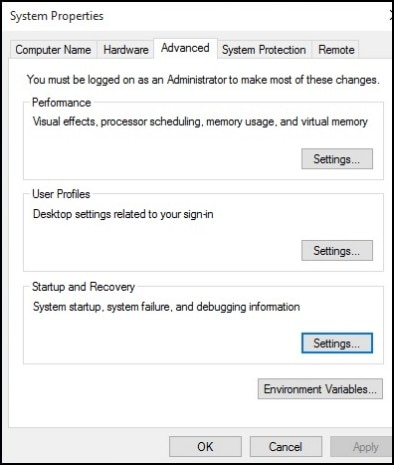
  2. Click Settings in the Startup and Recovery section.

    Figure : System Properties window

    System Properties window
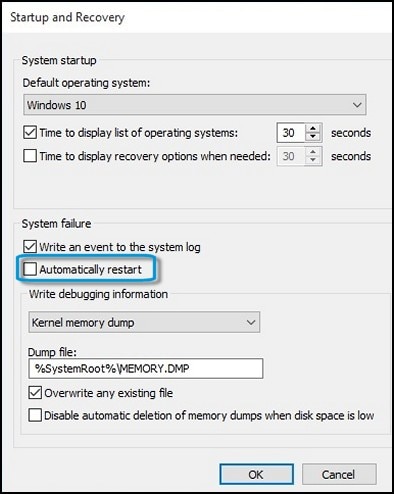
  3. Remove the check mark next to Automatically restart under System Failure, then click OK.

    Figure : Automatically restart check box

    Location of the Automatically restart check box
  4. Restart the computer.

       NOTE:

    The computer no longer restarts automatically when a problem occurs. Instead, a blue screen appears with more useful information. You can now search for a resolution using the information in the error.

Step 2: Checking for failed hardware

Hardware problems can cause the computer to restart unexpectedly. For more information about checking for hardware problems, see Testing for Hardware Failures (Windows 10,  for desktop computers, or Testing for Hardware Failures (Windows 10,  for notebook computers.


CLICK HERE FOR MORE STEPS AND INSTRUCTIONS.

(By the end of this article all the issues should be resolved)


Keep us posted,

If you would like to thank us for our efforts to help you, 


Give us a virtual high-five by clicking the 'Thumbs Up' icon below, followed by clicking on the "Accept as solution" on this post, 


Have a great day!

HP Recommended

Hello Praveen,

My problem is not regarding automatically restart, it's about automatically shut down and it's not always happening. When the charge of the laptop falls below 35%-40% then only it shuts down automatically, like a normal pc without having UPS shuts down after removing the power cord.

I changed the battery settings so that now it shows the low battery at 40%. Because I always have to keep the power of the battery above 40% to avoid the shutdown. It's very annoying.

Kindly guide me more to resolve the issue. Thank You.

HP Recommended

@Aniketshom


I understand your concerns.


 try the below: 

Steps to uninstall the ACPI drivers 

Right-Click on start button> click device manager> Batteries>then select the s drivers and right-click on it and uninstall all battery drivers. 

Then restart the computer and check again. 


Link for battery testing and calibration 


Please update the BIOS.


Have a nice day!!

† The opinions expressed above are the personal opinions of the authors, not of HP. By using this site, you accept the <a href="https://www8.hp.com/us/en/terms-of-use.html" class="udrlinesmall">Terms of Use</a> and <a href="/t5/custom/page/page-id/hp.rulespage" class="udrlinesmall"> Rules of Participation</a>.