• ×
    Information
    Need Windows 11 help?
    Check documents on compatibility, FAQs, upgrade information and available fixes.
    Windows 11 Support Center.
  • post a message
  • ×
    Information
    Need Windows 11 help?
    Check documents on compatibility, FAQs, upgrade information and available fixes.
    Windows 11 Support Center.
  • post a message
Guidelines
Join the HP Community Solve‑a‑thon | Help Others & Share Your Solutions | Live on Zoom | 2:30 PM to 2:30 AM IST | Every Wednesday Click here to know more
Check out our WINDOWS 11 Support Center info about: OPTIMIZATION, KNOWN ISSUES, FAQs, VIDEOS AND MORE.
HP Recommended
Pavilion 15t-n200
Microsoft Windows 7 (64-bit)

On a very recent vacation, I had the battery on my HP laptop completely drain. For a couple of days, I would get three flashing white dots, but when I plugged the laptop in, I could not turn it on. Now, the laptop is dead, despite having purchased a replacement 65W power adapter.


I am using this type (HP 65W Slim with USB AC Adapter Model G6H47AA#ABA) of power adapter for my Pavilion laptop.


Are there any further steps I can take to try and get the laptop to turn on, or do I have a fried motherboard?

4 REPLIES 4
HP Recommended

Any help here? It would be appreciated!

HP Recommended

@ramirez412001 Welcome to HP Forums Community!

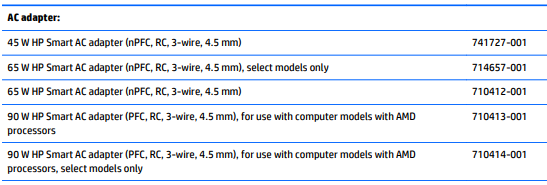
If the 65W adapter matches the description of parts tested and approved by HP as per the below list, it should work just fine, refer to your service and maintenance guide for more details: Click here & check Page. 24 Chapter 3 Illustrated parts catalog:


I suggest you perform a hard reset using the below link to release any static that could be causing this issue:

Click here for details.


If the issue persists, please check with an alternate power cord, another wall outlet and also, please tell me exactly where these "while flashing dots" are?


Keep us posted,

If you would like to thank us for our efforts to help you, 

Give us a virtual high-five by clicking the 'Thumbs Up' icon below, followed by clicking on the "Accept as solution" on this post, 

Have a great day!

Riddle_Decipher
I am an HP Employee


Learning is a journey, not a destination.
Let's keep asking questions and growing together.
HP Recommended

I have done all these steps multiple times to no avail. And with regard to the lights, just below the power supply jack, there is a charging light. (Orange when charging, whitish-purple when charged) It was this light that was initially flashing when the power was drained. When the laptop power button was pressed, this light would flash three times.


Now, that does not occur anymore, which likely means that the battery has been completely drained. That being said, I was not thrilled that it took 72 hours to get even this response, so I have already brought my HP laptop to a local, trusted repair shop verified by the BBB, and we discussed problems and solutions. I expect to hear from him tomorrow.

HP Recommended

@ramirez412001 We usually wait for a set period of time, for the community members to respond before we jump into the conversation, that said, the light flashing three times represents the battery draining, basically when the laptop is running on battery without the adapter connected to it, and if you had one connected and yet received those flashes, you may want to check with an alternate adapter as suggested earlier.


Please let us know how it goes with the local tech and we'll be happy to help, accordingly.

Riddle_Decipher
I am an HP Employee


Learning is a journey, not a destination.
Let's keep asking questions and growing together.
† The opinions expressed above are the personal opinions of the authors, not of HP. By using this site, you accept the <a href="https://www8.hp.com/us/en/terms-of-use.html" class="udrlinesmall">Terms of Use</a> and <a href="/t5/custom/page/page-id/hp.rulespage" class="udrlinesmall"> Rules of Participation</a>.