-
×InformationNeed Windows 11 help?Check documents on compatibility, FAQs, upgrade information and available fixes.
Windows 11 Support Center. -

-
×InformationNeed Windows 11 help?Check documents on compatibility, FAQs, upgrade information and available fixes.
Windows 11 Support Center. -
- HP Community
- Notebooks
- Notebook Operating System and Recovery
- Re: New HPStream14 loses micro SD - WIN11

Create an account on the HP Community to personalize your profile and ask a question
02-12-2023 01:46 AM
New product Stream14 OS WIN 11. The microSD keeps dropping off. I have to re-insert it live to restore. Pins cleaned. Card is populated from previous use in older Stream13. Never a problem. Swap to alternative card. Same problem.
Another question: I have weird experience of LH Touchpad button (sometimes) failing to click. Feels locked. Is this normal?
In anticipation I thank you. BerryG
02-24-2023 12:15 PM
Welcome to the HP support community
I understand that you are getting issues with the SD card and touchpad on your notebook, I am glad to assist you.
Update the Bios, chipset, and drivers using HP Support Assistant.
Download and run the HP Support Assistant from this Link: Click here
- HPSA will automatically search for all the latest drivers for your Notebook
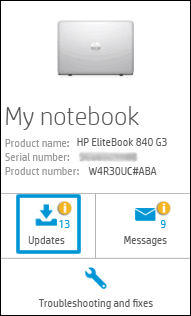
- Click My devices in the top menu, and then click Updates in the My PC or My notebook pane.

- Click Check for updates and messages to scan for new updates.

- Review the list of updates. Updates with a yellow information icon are recommended. Updates with a blue information icon are optional.
- Click the update name for a description, version number, and file size.
- Select the box next to any updates you want to install, and then click Download and install.
Also, ensure Windows is up to date.
- Select the Start button, and then go to Settings > Update & security > Windows Update , and select Check for updates. If Windows Update says your device is up to date, you have all the updates that are currently available
Let me know how it goes.
To thank me for my efforts to help you, please mark my post as an accepted solution so that it benefits several others.
Cheers.
Sandytechy20
I am an HP Employee
02-25-2023 04:02 AM - edited 02-25-2023 04:03 AM
My reply to Sandytechy20
First of all thanks for your response. I cannot make the link you provided work. Goes to Error page 404.
Asked to install Solutions Framework. Failed first time but now appears installed OK but I keep being asked to install again.
Managed to get Support Assistant to check Drivers. All OK. I wonder if it can help with the chipset & BIOS check/upgrade?
WIN11 V22H2 is installed on 10th Feb with other subsequent cumulative updates listed 12th &14thFeb.
What is the CHIPSET update? I thought it wasn't programmable. How do I instigate that?
Can the BIOS also be checked & updated through the Virtual assistant?
02-28-2023 10:16 PM
This might require one on one interaction to fix the issue, I am sending you a private message with the steps to talk to HP support.
Please check the mailbox icon at the top-right corner of this screen.
I hope this helps resolve this issue completely.
If this helps, please mark the public post as an accepted solution so that it benefits several others.
Cheers
Sandytechy20
I am an HP Employee