-
×InformationNeed Windows 11 help?Check documents on compatibility, FAQs, upgrade information and available fixes.
Windows 11 Support Center. -

-
×InformationNeed Windows 11 help?Check documents on compatibility, FAQs, upgrade information and available fixes.
Windows 11 Support Center. -
- HP Community
- Notebooks
- Notebook Operating System and Recovery
- Re: Physical Memory Usage

Create an account on the HP Community to personalize your profile and ask a question
06-02-2020 01:38 AM
Hi there
My Pavilion 15 is just about two months old and I had had no issues with it in that time until last Saturday when it started running incredibly slowly. I checked the task manager which showed that 60% of the physical memory was in use. Since then the memory usage has fluctuated between 50 and 70%. This seems odd as there only ever a couple of applications running.
I've rolled back the laptop to a previous save point and also used Fresh Start on Windows10 and this had no effect. I've followed the HP support guidance on slow performance and again this did not resolve anything.
Things seem to be running normally at the moment but I was wondering whether the high level of physical memory usage was normal or indicative that there is an issue somewhere.
Many thanks in advance for your advice.
Tim
06-02-2020 02:49 AM - edited 06-02-2020 02:53 AM
Hello @TimC66
It is normal if there is something running. Usually there is.
It is not an indication of an issue - it is an indication that there is something going on (which is not necessary an issue)
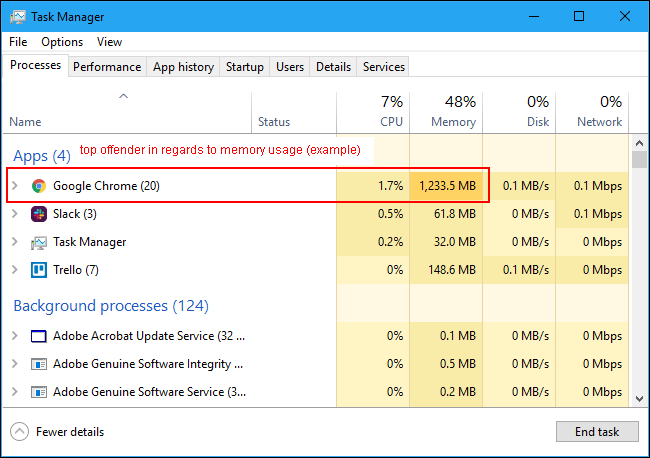
If it happens again, you may be able to investigate using Task Manager by sorting the usage by memory for example. Here is the complete Task Manager guide >> https://www.howtogeek.com/405806/windows-task-manager-the-complete-guide/
Windows 10 is very "talkative" operating system - it updates itself automatically, it checks for updates, it sends telemetry and statistics. Additionally, you may have some other app which takes resources. It's a matter of investigation what takes the resources at that particular moment.
Hope this helps
*** HP employee *** I express personal opinion only *** Joined the Community in 2013