• ×
    Information
    Need Windows 11 help?
    Check documents on compatibility, FAQs, upgrade information and available fixes.
    Windows 11 Support Center.
  • post a message
  • ×
    Information
    Need Windows 11 help?
    Check documents on compatibility, FAQs, upgrade information and available fixes.
    Windows 11 Support Center.
  • post a message
Guidelines
Seize the moment! nominate yourself or a tech enthusiast you admire & join the HP Community Experts!
Check out our WINDOWS 11 Support Center info about: OPTIMIZATION, KNOWN ISSUES, FAQs, VIDEOS AND MORE.
HP Recommended

Here’s the English translation of your text:


Power issue: I updated the BIOS from version V1.06 to V1.62 on my HP ProBook 450 G3  Intel Core i5. Since this update, my battery and power adapter no longer work properly. The computer no longer recognizes the battery, yet I cannot start it without the battery. I have tried all the HP software tools without success. I even attempted to restore the BIOS to the previous version, but I receive an error message saying that the system policy prevents BIOS restoration. I need your help, please...


Would you like me to also rephrase it into a more formal style, as if you were writing to HP support?

1 REPLY 1
HP Recommended

Looking here, and expanding "revision history", I see a number of changes in the firmware related to the battery.


I see "shipmode" and some type of battery manager was added was added to the bios.

Look in the bios setup for anything related to battery maintenance and make sure the system is not in "shipmode" whatever that is.  I am guessing that lithium batteries are disabled when a laptop is shipped.  Just guessing.


Do a cmos reset first:  

Follow the steps below to reset computer CMOS data.

1. Turn off the computer.
2. Press and hold the Windows and the V keys.
3. While still pressing those keys, press and hold down the Power button on the computer for 2-3 seconds.
4. Release all the keys.
5. At the completion of a successful CMOS reset, a message showing CMOS Reset (502) will be displayed.
6. Restart the computer.
7. Press F10 to get in to bios. Check Date and time.
8. Press F9 to set bios defaults. Ensure secure boot is enabled.
9. save setting when you exit


If you do not see that 502 message then :

  • Turn on the computer by holding the power button down for 20 full seconds then release.
  • Press the Power button one more time (if necessary) to start the computer.
  • Tap the ESC key about once a second after you see the LEDs on the keyboard flash.
  • Do steps 7-9 above


Let me know what you find out.

Please run the battery report and post the summery.
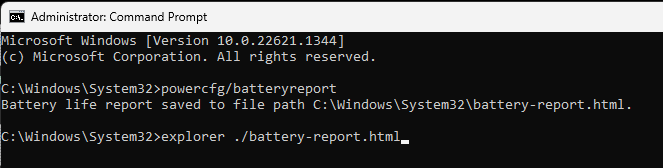
You run the battery report by bringing up the administrator command window and running

 powercfg/batteryreport 


as shown below


After entering that explorer line you should see something like the following. You will have to click on it as it is long
https://stateson.net/docs/SP4_battery-report.html
Battery should last about 5 years but less for gaming systems.

Have you done a battery calibration?
If not, then do the battery report both before and after the calibration.
Save the results so you can compare.


Thank you for using HP products and posting to the community.
I am a community volunteer and do not work for HP. If you find
this post useful click the Yes button. If I helped solve your
problem please mark this as a solution so others can find it
† The opinions expressed above are the personal opinions of the authors, not of HP. By using this site, you accept the <a href="https://www8.hp.com/us/en/terms-of-use.html" class="udrlinesmall">Terms of Use</a> and <a href="/t5/custom/page/page-id/hp.rulespage" class="udrlinesmall"> Rules of Participation</a>.