• ×
    Information
    Need Windows 11 help?
    Check documents on compatibility, FAQs, upgrade information and available fixes.
    Windows 11 Support Center.
  • post a message
  • ×
    Information
    Need Windows 11 help?
    Check documents on compatibility, FAQs, upgrade information and available fixes.
    Windows 11 Support Center.
  • post a message
Guidelines
Join the HP Community Solve‑a‑thon | Help Others & Share Your Solutions | Live on Zoom | 2:30 PM to 2:30 AM IST | Every Wednesday Click here to know more
Check out our WINDOWS 11 Support Center info about: OPTIMIZATION, KNOWN ISSUES, FAQs, VIDEOS AND MORE.
HP Recommended
Envy 17
Microsoft Windows 7 (64-bit)

Hey guys, i’ve been trying to save my notebook although i’m not very expert on it, but i’m stuck at the HP Recovery, really need some help, since i don’t have HP support here in my country and don’t know profissionals i can trust in... 

It all started with the notebook getting a black screen after windows logo, no login screen (i used to have windows 10). Besides that, it was all stripped in red. Tried some recoveries but they didn’t work, so i made a backup (because of some important pictures) and went for the complete recovery, to original standards. At first the stripes were gone, but still black screen after windows logo (now windows 7 that came with it). 

When i try to start in safe mode, it shows it’s configurating for first use but then i get a CTO error, the recovery is incomplete.

Tried to check the HD and the memory, and long DST tests but everything says passed, only the battery that is gone for long already, i just use it plugged in. 

Is there any way i can try to save it? Specially getting back my stuff from the backup i made?

I don’t have Windows CDs since the Envy didn’t come with it...


1 REPLY 1
HP Recommended

@LilicaRBL 


Sorry, but I don't have very good news for you ...

You said something about stripes -- are these vertical stripes on the screen? If so, that means the screen is failing.


As to data recovery, your best bet for recovering data now is to do the following:
1) Remove the hard drive from the old PC
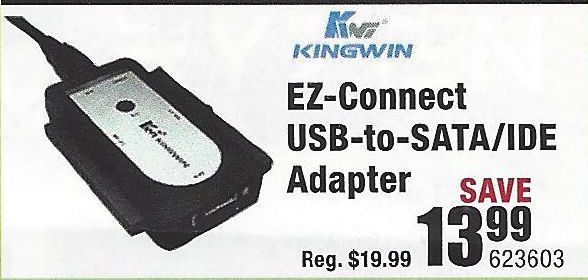
2) Purchase a USB-to-Hard Driver adapter kit (like the one illustrated below)

USB-Drive-Adapter.jpg

3) Connect the old drive to a working PC using that adapter
4) Try to retrieve the files and folders you want to save from the old drive and copy them to the new PC.

If this does not work, then you need to do the following:
1) Download and install this utility on a working PC http://www.majorgeeks.com/news/story/recover_data_in_3_steps_with_minitool_power_data_recovery_free_...
2) Run the data recovery utility to see what can be retrieved from the old drive.

If that tool does not find what you need, an alternative is Recuva http://www.piriform.com/recuva

And, if that does not work well, the best tool out there is this one, but only the trial version is free http://www.file-recovery.com/


I am a volunteer and I do not work for, nor represent, HP
† The opinions expressed above are the personal opinions of the authors, not of HP. By using this site, you accept the <a href="https://www8.hp.com/us/en/terms-of-use.html" class="udrlinesmall">Terms of Use</a> and <a href="/t5/custom/page/page-id/hp.rulespage" class="udrlinesmall"> Rules of Participation</a>.