• ×
    Information
    Need Windows 11 help?
    Check documents on compatibility, FAQs, upgrade information and available fixes.
    Windows 11 Support Center.
  • post a message
  • ×
    Information
    Need Windows 11 help?
    Check documents on compatibility, FAQs, upgrade information and available fixes.
    Windows 11 Support Center.
  • post a message
Guidelines
Seize the moment! nominate yourself or a tech enthusiast you admire & join the HP Community Experts!
Check out our WINDOWS 11 Support Center info about: OPTIMIZATION, KNOWN ISSUES, FAQs, VIDEOS AND MORE.
HP Recommended
G62
Microsoft Windows 7 (32-bit)

I’m trying to access an old laptop but I am stuck in HP recovery manager.  It gives me 3 options.  I keep trying to back up everything on the computer but it will only let me back up on disk.  I have tried DVD-R and DVD+R and with both I get an error message that the disk can be incompatible or not enough space and so on.  Is there any way of recovery if these files and pictures? 

1 REPLY 1
HP Recommended

@Jerico13 

First off, a single DVD is not going to be nearly large enough to hold an entire PC backup.


Second, if this were my PC, I would focus on retrieving the files and folders from the drive and deal with recovering it to working condition later.


Your best bet for recovering data now is to do the following:
1) Remove the hard drive from the old PC
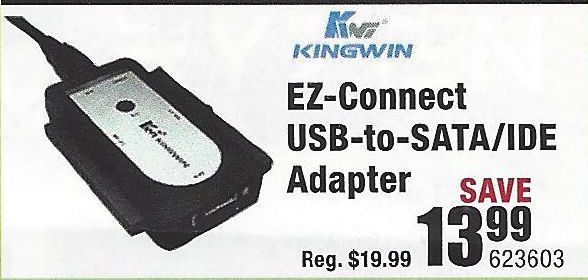
2) If you have a desktop PC with a spare hard drive connector, then connect the old drive to that -- both the power cable and the data cable. If you only have a notebook PC, then you will need to purchase a USB-to-Hard Driver adapter kit (like the one illustrated below)
USB-Drive-Adapter.jpg
3) Connect the old drive to a working PC,using that adapter if it is a laptop
4) Try to retrieve the files and folders you want to save from the old drive and copy them to the new PC.

If this does not work, then you need to do the following:
1) Download and install this utility on a working PC http://www.majorgeeks.com/news/story/recover_data_in_3_steps_with_minitool_power_data_recovery_free_...
2) Run the data recovery utility to see what can be retrieved from the old drive.

If that tool does not find what you need, an alternative is Recuva http://www.piriform.com/recuva

And, if that does not work well, the best tool out there is this one, but only the trial version is free http://www.file-recovery.com/


I am a volunteer and I do not work for, nor represent, HP
† The opinions expressed above are the personal opinions of the authors, not of HP. By using this site, you accept the <a href="https://www8.hp.com/us/en/terms-of-use.html" class="udrlinesmall">Terms of Use</a> and <a href="/t5/custom/page/page-id/hp.rulespage" class="udrlinesmall"> Rules of Participation</a>.