• ×
    Information
    Need Windows 11 help?
    Check documents on compatibility, FAQs, upgrade information and available fixes.
    Windows 11 Support Center.
  • post a message
  • ×
    Information
    Need Windows 11 help?
    Check documents on compatibility, FAQs, upgrade information and available fixes.
    Windows 11 Support Center.
  • post a message
Guidelines
Seize the moment! nominate yourself or a tech enthusiast you admire & join the HP Community Experts!
Check out our WINDOWS 11 Support Center info about: OPTIMIZATION, KNOWN ISSUES, FAQs, VIDEOS AND MORE.
HP Recommended
HP ENVY x360 Convertible 15m-bp1xx
Microsoft Windows 10 (64-bit)

MY SYSTEM IS NOT SET TO SLEEP OR HIBERNATE, BUT WHEN I CLOSE THE LID IT DOES. AND IT WILL NOT COME BACK ON. ALL I GET IS A BLACK SCREEN AND THE ONLY WAY TO GET IT BACK IS TO TURN OFF MANUALLY WITH THE POWER BUTTON. I HAVE IT SET TO NEVER SLEEP, NEVER HIBERNATE, AND TO 'DO NOTHING' WHEN I CLOSE THE LID. NO MATTER WHAT I DO I CANNOT STOP THIS FROM HAPPENING. I HAVE USED THE HP ASSISTANT TROUBLESHOOTER, I HAVE TRIED TO UPDATE THE KEYBOARD DRIVER, NOTHING WORKS.HELP!!!!

3 REPLIES 3
HP Recommended

@jkhcast Welcome to HP Forums Community!

I suggest you update the BIOS, Graphics card and Chipset drivers: Click here to access the HP website to get the same done,

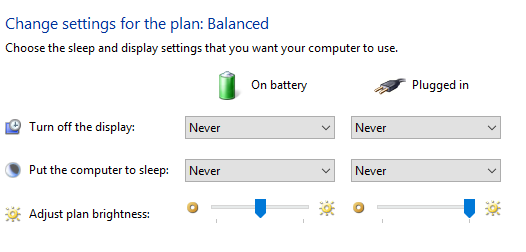
if the issue persists, please turn off all sleep settings as shown in the below image:

Keep us posted,

If you would like to thank us for our efforts to help you, 

Give us a virtual high-five by clicking the 'Thumbs Up' icon below, followed by clicking on the "Accept as solution" on this post, 

Have a great day!

Riddle_Decipher
I am an HP Employee


Learning is a journey, not a destination.
Let's keep asking questions and growing together.
HP Recommended

i have updated everything that has an update available and you clearly didnt read my email. i ALREADY have EVERYTHING SET TO 'NEVER' . SO NOW WHAT?

HP Recommended

@jkhcast Just to clarify, I suggested you make the changes after installing all the updates for BIOS among others like windows updates, since these updates may change the options automatically, that said, I suggest you create a new user account (admin) and check if that works fine, if not, you may want to backup all personal data and perform a system reset using the steps in this link: Click here for details.


If you wish to thank me for my efforts, you could click on "Accept as solution" on my post as the solution should help others too.

Riddle_Decipher
I am an HP Employee


Learning is a journey, not a destination.
Let's keep asking questions and growing together.
† The opinions expressed above are the personal opinions of the authors, not of HP. By using this site, you accept the <a href="https://www8.hp.com/us/en/terms-of-use.html" class="udrlinesmall">Terms of Use</a> and <a href="/t5/custom/page/page-id/hp.rulespage" class="udrlinesmall"> Rules of Participation</a>.