• ×
    Information
    Need Windows 11 help?
    Check documents on compatibility, FAQs, upgrade information and available fixes.
    Windows 11 Support Center.
  • post a message
  • ×
    Information
    Need Windows 11 help?
    Check documents on compatibility, FAQs, upgrade information and available fixes.
    Windows 11 Support Center.
  • post a message
Guidelines
Join the HP Community Solve‑a‑thon | Help Others & Share Your Solutions | Live on Zoom | 2:30 PM to 2:30 AM IST | Every Wednesday Click here to know more
Check out our WINDOWS 11 Support Center info about: OPTIMIZATION, KNOWN ISSUES, FAQs, VIDEOS AND MORE.
HP Recommended
hp laptop

hey, 


I restarted my laptop because it was very laggy. (kept freezing or slow down unexpectedly) As it restarted it updated as well, it finished and I noticed something strange. The text under icons on my home screen were black as well as blurred. I didn't think there was a problem until I opened apps/software/programs/games and no text appeared. where the text should've been there was a black line (vertically). please help, I cant do my work if this isn't fixed.guess3.JPGguess.jpgguess3.JPG

1 REPLY 1
HP Recommended

@KJxlynn 

Sorry to give you bad news ... but a severely laggy PC is nearly always caused by a failing drive.  That happens because sectors fail and the drive controller attempts to read them, but fails, and retries over and over until it gives up.


To check for hard drive failing, if your PC is new enough to support UEFI, you can use these steps to test the hard drive: http://support.hp.com/us-en/document/c00439024

If not, you have to follow these steps:
1) Press Esc key repeatedly, several times a second, while rebooting the laptop. Do NOT hold the key down, just press it over and over.
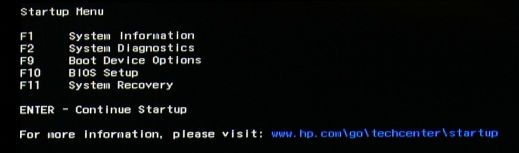
2) Eventually, you will see an HP Startup Menu -- that will look similar to the image below ...
HP Startup Menu.jpg
3) press the Function key for testing the hard drive (usually F2) and let it run.

Please report back the test results.


I am a volunteer and I do not work for, nor represent, HP
† The opinions expressed above are the personal opinions of the authors, not of HP. By using this site, you accept the <a href="https://www8.hp.com/us/en/terms-of-use.html" class="udrlinesmall">Terms of Use</a> and <a href="/t5/custom/page/page-id/hp.rulespage" class="udrlinesmall"> Rules of Participation</a>.