
-
×InformationNeed Windows 11 help?Check documents on compatibility, FAQs, upgrade information and available fixes.
Windows 11 Support Center. -
-
×InformationNeed Windows 11 help?Check documents on compatibility, FAQs, upgrade information and available fixes.
Windows 11 Support Center. -
- HP Community
- Notebooks
- Notebook Operating System and Recovery
- Re: Trying to reinstall windows 10, says missing media drive...

Create an account on the HP Community to personalize your profile and ask a question
Your account also allows you to connect with HP support faster, access a personal dashboard to manage all of your devices in one place, view warranty information, case status and more.
Check out our WINDOWS 11 Support Center info about: OPTIMIZATION, KNOWN ISSUES, FAQs, VIDEOS AND MORE.

It has been a while since anyone has replied. Simply ask a new question if you would like to start the discussion again.

08-02-2026 09:27 AM
 HP Recommended
Product: HP Notebook - 15t-db000 CTO
Operating System: Microsoft Windows 10 (64-bit)
I have an older laptop, 15z-db000, Prod ID 3FU80AV. It gave me some issues a couple years ago and I had windows removed and replaced with Fedora. I don't really like Fedora, so I'm trying to reinstall windows. I have used the Microsoft Creation tool and Rufus to build a bootable usb, using a couple different .iso filed for Windows 10. I have tried inserting the usb into every usb port i have. Sometimes it does not recognize the usb so I have to restart the computer, when it does, it will start the windows install, but then says it's missing a media driver. I have downloaded what drivers I could find from HP support, with no luck. Can anyone help me out?
8 REPLIES 8


08-02-2026 10:03 AM
HP Recommended
Are you wanting the "Media Pack" ?
How To Install Windows Media Player In Windows 10/11
Media feature pack for Windows 10 N and Windows 10 KN editions is explained here.
More information about the N and KN edition is here
You can download windows 10 here
Thank you for using HP products and posting to the community.
I am a community volunteer and do not work for HP. If you find
this post useful click the Yes button. If I helped solve your
problem please mark this as a solution so others can find it


08-02-2026 03:41 PM
HP Recommended
Make sure you have bios F.15
I assume you want to preserver any data file and apps you currently have. If that is not important you should put in windows 11 using the windows 10 key. It will work. let me know if you want to do that.
For window 10, go into the BIOS and set defaults. Make sure date and time are correct. Enable secure boot. Use the media creation tool to create a USB boot drive. Do not use rufus, stick with the default Microsoft usb boot.
You tried the windows repair, it did not work, and you cannot get your system to boot. Try a windows install with the option to keep files
Basically you download the latest window 10 (should work for 11), create a USB boot drive, boot up the USB version of Windows, do the install, but select the option that preserves all your data. You will need to know if using Windows Home, Pro or some other version.
Using another system go here and download the windows installation media. Specify the 16gb flash and be sure to check the 'Create installation media (USB)' and uncheck the 'Use the recommended options for this PC'
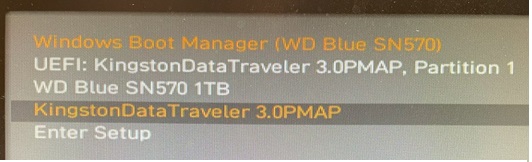
Insert the USB in to the system you need to repair and turn it on. Press ESC or DEL or F12 so that you can get into the bios and change the boot device. For example, the one with the dark bar highlight.
 |
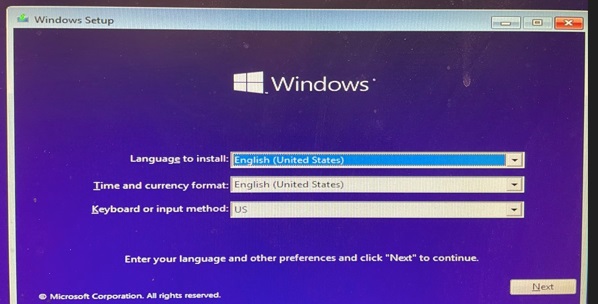
After the USB boots up select the language and agree to the fine print, if any.
 |
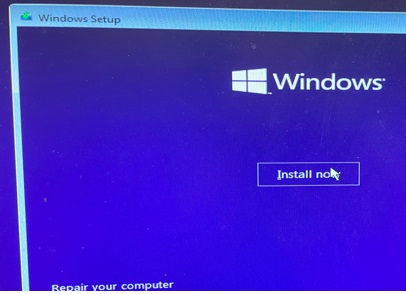
Once you agree the option to either install or repair will be shown. Since the repair did not work then chose install.
 |
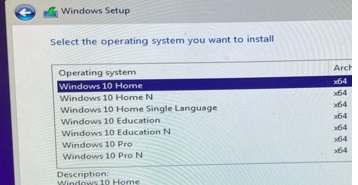
You must then pick the OS that was licensed. If there is no option for the correct OS you forgot to uncheck the 'Use the recommended options' earlier.
 |
The next screen will ask if you want to upgrade and preserve files or do a clean install and lose all your stuff.
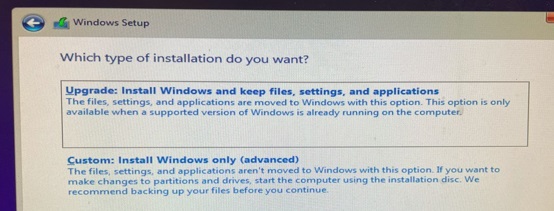 |
Log into windows using your Microsoft account (or your email) credentials. Use whatever credential you used to activate windows originally. Install the HP support assistant and let it download drivers.
Thank you for using HP products and posting to the community.
I am a community volunteer and do not work for HP. If you find
this post useful click the Yes button. If I helped solve your
problem please mark this as a solution so others can find it
08-03-2026 11:08 AM
HP Recommended
@koolautomotive wrote:I have F.32, will that work? I am not worried about preserving any data, I do not have any Windows data remaining, it was completely wiped.
When using the product ID, instead of a model name, I got a newer bios, F.43.
Ignore that 15
Please go here an enter your serial number
select software 20h2 I think is the latest windows 10
verify you have the latest firmware which maybe f.43
Do the clean install of the latest windows 10. Do not use pro if the license is for home.
Thank you for using HP products and posting to the community.
I am a community volunteer and do not work for HP. If you find
this post useful click the Yes button. If I helped solve your
problem please mark this as a solution so others can find it
08-06-2026 08:06 PM
HP Recommended
I no longer have any OS installed, but I was able to update BIOS to F.43
I used the Microsoft program to download the latest Windows 10, and create a bootable USB. Hit install, it still comes up missing media driver...

08-06-2026 09:36 PM - edited 08-06-2026 09:40 PM
HP Recommended
This shows up frequently in google and it looks like the PC cannot read the USB drive.
Try an 8gb flash drive. I suspect a 32 or larger will not work. if the flash drive comes with free software on it (some do) you will need to remove the partition holding the free software. Usually encryption tools and other free spying stuff.
Microsoft's media creation tool may not be able to delete existing partitions,. just guessing. if it asks to delete be sure to allow.
Thank you for using HP products and posting to the community.
I am a community volunteer and do not work for HP. If you find
this post useful click the Yes button. If I helped solve your
problem please mark this as a solution so others can find it
08-09-2026 09:35 AM
HP Recommended
I bought an 8GB USB2.o flash drive and used the same media creation tool. Tried it and it just said “No bootable device”. Reformatted the disk, used diskpart to clear any partitions and then used the media creation tool again. Still says “No bootable device”, even tried it in the desktop that I created it with and does not seem to be working. I’ll try to write an ISO with Rufus next.

Be alert for scammers posting fake support phone numbers and/or email addresses on the community.
If you think you have received a fake HP Support message, please report it to us by clicking on "Flag Post".
† The opinions expressed above are the personal opinions of the authors, not of HP. By using this site, you accept the Terms of Use and Rules of Participation.


Didn't find what you were looking for?
Ask the community
† The opinions expressed above are the personal opinions of the authors, not of HP. By using this site, you accept the <a href="https://www8.hp.com/us/en/terms-of-use.html" class="udrlinesmall">Terms of Use</a> and <a href="/t5/custom/page/page-id/hp.rulespage" class="udrlinesmall"> Rules of Participation</a>.