• ×
    Information
    Need Windows 11 help?
    Check documents on compatibility, FAQs, upgrade information and available fixes.
    Windows 11 Support Center.
  • post a message
  • ×
    Information
    Need Windows 11 help?
    Check documents on compatibility, FAQs, upgrade information and available fixes.
    Windows 11 Support Center.
  • post a message
Guidelines
Seize the moment! nominate yourself or a tech enthusiast you admire & join the HP Community Experts!
Check out our WINDOWS 11 Support Center info about: OPTIMIZATION, KNOWN ISSUES, FAQs, VIDEOS AND MORE.
HP Recommended
hp dv6-7112HE
Microsoft Windows 7 (64-bit)

I factory reset it once using hard reset your tube video and had to hold some keys down and it says Wi-Fi connected but wouldn't let me see any webbpages says cannot display, the portal to log into my apt complex never pops up so I can sign in, then it starts licking up ice going to factory reset iit and it says factory reset disabled. I've tried help meplaessafe mode reboot still says disabled I roll it back to earlier date nothing changes 

Please help me I've tried it all pressing f11 at start all the way to safe mode  to advanced boot.  I've done the bios thing with the shift B while turning it on and it goes black and caps just blinks I let it set like that over night night happened it to were once I log into it I can even click in one thing and it freezes task manage don't help I just want to write it bare to beginning 

1 ACCEPTED SOLUTION

Accepted Solutions
HP Recommended

@JimboSlICe189 

If your DV6 still has its original hard drive, then the freezing you are experiencing now is a good indication that the hard drive is dying.

To check the drive you have to follow these steps:
1) Press Esc key repeatedly, several times a second, while rebooting the laptop. Do NOT hold the key down, just press it over and over.
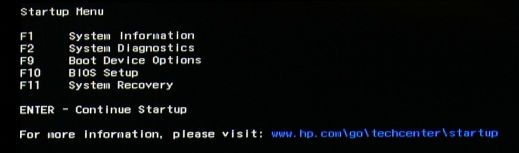
2) Eventually, you will see an HP Startup Menu -- that will look similar to the image below ...
HP Startup Menu.jpg
3) press the Function key for testing the hard drive (usually F2) and let it run.

Please report back the test results.


I am a volunteer and I do not work for, nor represent, HP

View solution in original post

3 REPLIES 3
HP Recommended

@JimboSlICe189 

If your DV6 still has its original hard drive, then the freezing you are experiencing now is a good indication that the hard drive is dying.

To check the drive you have to follow these steps:
1) Press Esc key repeatedly, several times a second, while rebooting the laptop. Do NOT hold the key down, just press it over and over.
2) Eventually, you will see an HP Startup Menu -- that will look similar to the image below ...
HP Startup Menu.jpg
3) press the Function key for testing the hard drive (usually F2) and let it run.

Please report back the test results.


I am a volunteer and I do not work for, nor represent, HP
HP Recommended

Okay friend I'm clicked on the Diagnostics and I'm testing the harddrive primary hard drive disk self test it's running the tests right now when he gets done I will reply back and let you know definitely getting kudos

HP Recommended

WaWood you're man! i been working on this for a solid week between my collage assignments, it worked 100% don't freeze up no more! now that it stopped freezin when i goto hook up to my apartments wifi it says its open network but when you connect it brings up a ""captive" portal if you will" that askes for username and password which you have to email my landlord and she adds you to her "list" and when you tyoe your stuff it logs you in the box it brings ups address is  "(n245.network-auth.com)" that were you put your credentials in but long story short i can click the wifi turn it on, then when it says connected i hit the enternet explorer and says cannot display web page.? never bringing the box up to sign in or nothing, i turned all security settings off, firewall antivirus everything and says cannot display web page when i trouble shoot it it also says cannot detect any problems??? i checked my network status , checked adapter settings ralink 5390R 802.11b/g/n 1x1.   ipv4 connectivity says internet i got a strong signal holdng at 80mbs< ssid mason-village 2 3> and ipv6 connectivity says no network access. i tried diagnose. nothing im pretty decent at not messingup my electronics im self taught 1000% but ibought this dv6 for 50$ at Ezpawn. now that i just factory restored it it took it back to 2012. everything is running smooth i got it hooked up to my 55in but the enternt????? can ya help me brother wawood? if not  im stumped brothers and sistas someone throw me a life line or point me in the right direction.

† The opinions expressed above are the personal opinions of the authors, not of HP. By using this site, you accept the <a href="https://www8.hp.com/us/en/terms-of-use.html" class="udrlinesmall">Terms of Use</a> and <a href="/t5/custom/page/page-id/hp.rulespage" class="udrlinesmall"> Rules of Participation</a>.