• ×
    Information
    Need Windows 11 help?
    Check documents on compatibility, FAQs, upgrade information and available fixes.
    Windows 11 Support Center.
  • post a message
  • ×
    Information
    Need Windows 11 help?
    Check documents on compatibility, FAQs, upgrade information and available fixes.
    Windows 11 Support Center.
  • post a message
Guidelines
Join the HP Community Solve‑a‑thon | Help Others & Share Your Solutions | Live on Zoom | 2:30 PM to 2:30 AM IST | Every Wednesday Click here to know more
Check out our WINDOWS 11 Support Center info about: OPTIMIZATION, KNOWN ISSUES, FAQs, VIDEOS AND MORE.
HP Recommended
hp pavilion e015tx
Microsoft Windows 10 (64-bit)

hi i have question regarding bios update. my laptop is running with latest windows 10  64 bit   1903 version. my laptop is currently having F.28 bios version and it is having intel core i5 3032m processor. is my laptop is compatible with F.04 Rev.A bios version or not. can i install this bios version to my laptop.

3 REPLIES 3
HP Recommended

@shravan144


To assist you better please provide me with complete Notebook Model or the Product Number


You can refer to this Link: hp.care/2bygf7l for help in locating the Product Number.


Thank you

KrazyToad
I Am An HP Employee

HP Recommended

my laptop model is hp pavilion e015tx. product number E3B55PA#ACJ. my laptop is running latest  windows 10 (1903) update.

can you suggest me which is the latest bios for my laptop. my current version bios is f.28. can i update my to f.11 rev A (sp98411).

HP Recommended

@shravan144


As per the HP Website, the last BIOS update for your Notebook was for Windows 8.1 BIOS Version F.28. It is not recommended to update the BIOS to another version if it is not specific to your Notebook


If you want to ensure you have all the latest drivers, Firmware etc for your Notebook, I suggest you download and run the HP Support Assistant from this Link: https://www8.hp.com/us/en/campaigns/hpsupportassistant/hpsupport.html?jumpid=va_r602_us/en/any/psg/p...


HPSA will automatically search for all the latest drivers for your Notebook


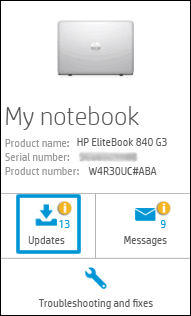
  1. Click My devices in the top menu, and then click Updates in the My PC or My notebook pane.

    Click Updates in the My notebook pane

  2. Click Check for updates and messages to scan for new updates.

     Updates list in HP Support Center

  3. Review the list of updates. Updates with a yellow information icon are recommended. Updates with a blue information icon are optional.

  4. Click the update name for a description, version number, and file size.

  5. Select the box next to any updates you want to install, and then click Download and install.

Also ensure Windows is up to date.


Select the Start  button, and then go to Settings  > Update & security  > Windows Update , and select Check for updates. If Windows Update says your device is up to date, you have all the updates that are currently available


Keep me posted how it goes


Thank you and have a wonderful day 😊


If the information I've provided was helpful, give us some reinforcement by clicking the "Solution Accepted" on this Post and it will also help other community members with similar issue.

KrazyToad
I Am An HP Employee

† The opinions expressed above are the personal opinions of the authors, not of HP. By using this site, you accept the <a href="https://www8.hp.com/us/en/terms-of-use.html" class="udrlinesmall">Terms of Use</a> and <a href="/t5/custom/page/page-id/hp.rulespage" class="udrlinesmall"> Rules of Participation</a>.