• ×
    Information
    Need Windows 11 help?
    Check documents on compatibility, FAQs, upgrade information and available fixes.
    Windows 11 Support Center.
  • post a message
  • ×
    Information
    Need Windows 11 help?
    Check documents on compatibility, FAQs, upgrade information and available fixes.
    Windows 11 Support Center.
  • post a message
Guidelines
Seize the moment! nominate yourself or a tech enthusiast you admire & join the HP Community Experts!
Check out our WINDOWS 11 Support Center info about: OPTIMIZATION, KNOWN ISSUES, FAQs, VIDEOS AND MORE.
HP Recommended
HP Pavilion tx2600 Entertainment Notebook PC series
Microsoft Windows 7 (64-bit)

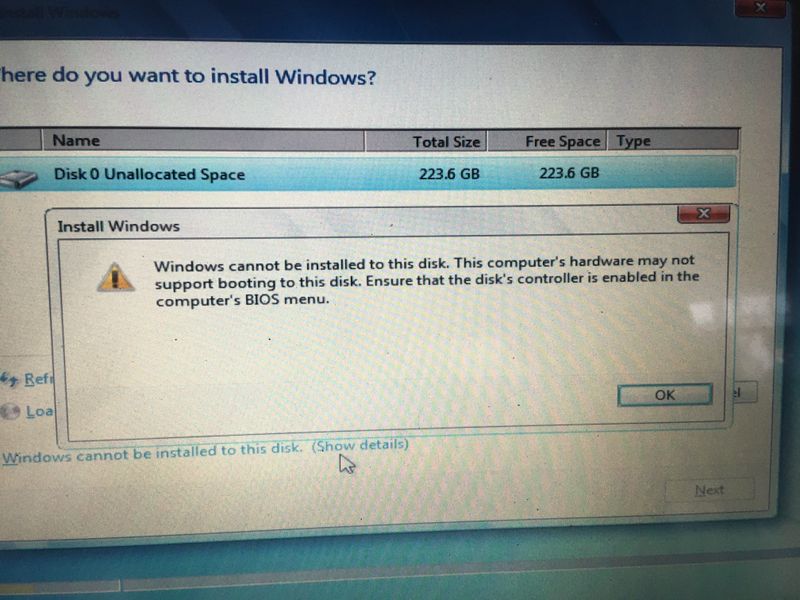
Hi i have old laptopt HP Pavilion tx2600 Entertainment Notebook PC series. i change HDD to SSD now i cant install windows i get error message when i trying install windows please help any solutions? or ideas?

"Windows cannot be installed to this disk. This computer's hardware may not support booting to this disk. Ensure the disk's controller is enabled in the computer's BIOS menu"

and one more problem i cant find my laptop support page here: https://support.hp.com/us-en/drivers/laptops


IMG_0033.JPG

image0.jpegimage1.jpegimage3 (1).jpeg

4 REPLIES 4
HP Recommended

@Giorgi379 

First off, we can't help you with the product key as HP keeps no records of individual product keys associated with individual PCs.


Second, with older PCs, what SOMETIMES works is connecting the drive to another PC and then formatting the drive with a single NTFS partition on it.  Then, when you reconnect to this PC, the Windows installer should see that partition and allow you to install to it.


If that does not work, then your PC needs a special driver to see the SSD and HP does not provide such drivers.


I am a volunteer and I do not work for, nor represent, HP
HP Recommended

in bios i cant this SSD. i trying  install windows in another PC and sysprep with generalize then connect laptop but leptop dont see any drive

p.s i cant find any support page for this laptop download drivers or never version of bios **bleep** ?! this is insane

HP Recommended

@Giorgi379 

If BIOS does not see the drive, there is nothing you can do to access it.


I can't find any info at HP about this model, so I'm guessing it's 10 years old, or about that, right? And if that is the case, you are out of luck because HP only supports models for about five years.


I am a volunteer and I do not work for, nor represent, HP
HP Recommended

thanks ❤️

† The opinions expressed above are the personal opinions of the authors, not of HP. By using this site, you accept the <a href="https://www8.hp.com/us/en/terms-of-use.html" class="udrlinesmall">Terms of Use</a> and <a href="/t5/custom/page/page-id/hp.rulespage" class="udrlinesmall"> Rules of Participation</a>.