• ×
    Information
    Need Windows 11 help?
    Check documents on compatibility, FAQs, upgrade information and available fixes.
    Windows 11 Support Center.
  • post a message
  • ×
    Information
    Need Windows 11 help?
    Check documents on compatibility, FAQs, upgrade information and available fixes.
    Windows 11 Support Center.
  • post a message
Guidelines
Seize the moment! nominate yourself or a tech enthusiast you admire & join the HP Community Experts!
Check out our WINDOWS 11 Support Center info about: OPTIMIZATION, KNOWN ISSUES, FAQs, VIDEOS AND MORE.
HP Recommended
HP Pavilion g6-1d00 Notebook PC series
Microsoft Windows 7 (64-bit)

Hi there,

downloaded the BIOS for my laptop HP Pavilion g6 1075sg from here: https://support.hp.com/hr-en/drivers/selfservice/hp-pavilion-g6-1000-notebook-pc-series/5046257/mode...

opened the file (no matter if I used 7-zip or windows) and tried to follow the steps described here: https://support.hp.com/hr-en/document/c02693833#recover

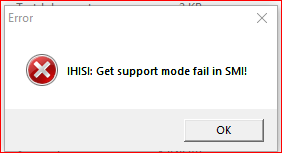
now, here's the problem: I got the HP install shield, could accept terms and license agreements and afterwards just got these two following error messages (s. pictures attached):

IHISI: Get support mode fail in SM! and after having "okd" that, the next one's: BIOS did not support InsydeFlash!

A new directory, named c:\SwSetup\SP57396 is created, but if I try to run the InsydeFlash.exe-file I'm getting the error messages as above and no option to recreate a recovery file on an USB-flash drive is displayd.

Could anybody please help?

Thnx a lot and have a nice wintery Sunday,

MClaesIHISI.PNGInsydeFlash.PNG

3 REPLIES 3
HP Recommended

Hi @MClaes,


Welcome to HP Forums, 

This is a great place to get support, find answers and tips, 

Thank you for posting your query, I'll be more than glad to help you out 🙂


I understand that you are unable to run the bios using the flash drive

Don't worry I'll be glad to help you.


Try to download the BIOS directly to the computer and check if it works?

Or,

Download the BIOS again to the flash drive and check if it works?


Eagerly waiting for your reply.

Cheers!


Raj1788
I am an HP Employee 

HP Recommended

That solution does not work!!!

Any other sugestion?

HP Recommended

That solution does not work!!!

Any other sugestion?


@Raj1788 wrote:


Try to download the BIOS directly to the computer and check if it works?

Or,

Download the BIOS again to the flash drive and check if it works?


† The opinions expressed above are the personal opinions of the authors, not of HP. By using this site, you accept the <a href="https://www8.hp.com/us/en/terms-of-use.html" class="udrlinesmall">Terms of Use</a> and <a href="/t5/custom/page/page-id/hp.rulespage" class="udrlinesmall"> Rules of Participation</a>.