• ×
    Information
    Need Windows 11 help?
    Check documents on compatibility, FAQs, upgrade information and available fixes.
    Windows 11 Support Center.
  • post a message
  • ×
    Information
    Need Windows 11 help?
    Check documents on compatibility, FAQs, upgrade information and available fixes.
    Windows 11 Support Center.
  • post a message
Guidelines
Join the HP Community Solve‑a‑thon | Help Others & Share Your Solutions | Live on Zoom | 2:30 PM to 2:30 AM IST | Every Wednesday Click here to know more
Check out our WINDOWS 11 Support Center info about: OPTIMIZATION, KNOWN ISSUES, FAQs, VIDEOS AND MORE.
HP Recommended
HP Notebook - 17
Microsoft Windows 10 (64-bit)

I was having an issue with my internet connection, i couldnt click on the internet button to turn it off and back on so i restarted my laptop, when i rebooted it was basically restored to factory, a few apps stayed, but all my files are gone, i tried to restore from history but it says there is no history, I am not sure if this is an HP issue or a Windows issue or a combination of both, im trying to not have to completely reset my laptop, i do have some files backed up on a thumb drive but i would like to try to recover all of them, please anyone if you can give me some suggestions if this happened to you i would really appreciate it.


Thanks in advance


Micka

1 REPLY 1
HP Recommended

@Micka37 

Your best bet for recovering data now is to do the following:
1) Remove the hard drive from the old PC
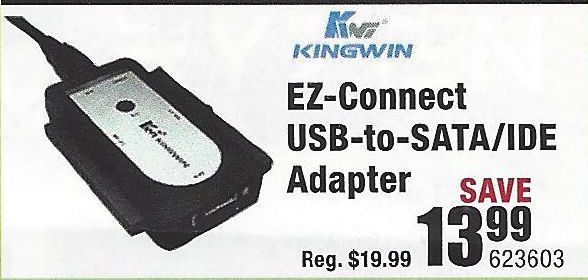
2) Purchase a USB-to-Hard Driver adapter kit (like the one illustrated below)

USB-Drive-Adapter.jpg

3) Connect the old drive to a working PC using that adapter
4) Try to retrieve the files and folders you want to save from the old drive and copy them to the new PC.

If this does not work, then you need to do the following:
1) Download and install this utility on a working PC http://www.majorgeeks.com/news/story/recover_data_in_3_steps_with_minitool_power_data_recovery_free_...
2) Run the data recovery utility to see what can be retrieved from the old drive.

If that tool does not find what you need, an alternative is Recuva http://www.piriform.com/recuva

And, if that does not work well, the best tool out there is this one, but only the trial version is free http://www.file-recovery.com/


I am a volunteer and I do not work for, nor represent, HP
† The opinions expressed above are the personal opinions of the authors, not of HP. By using this site, you accept the <a href="https://www8.hp.com/us/en/terms-of-use.html" class="udrlinesmall">Terms of Use</a> and <a href="/t5/custom/page/page-id/hp.rulespage" class="udrlinesmall"> Rules of Participation</a>.