• ×
    Information
    Need Windows 11 help?
    Check documents on compatibility, FAQs, upgrade information and available fixes.
    Windows 11 Support Center.
  • post a message
  • ×
    Information
    Need Windows 11 help?
    Check documents on compatibility, FAQs, upgrade information and available fixes.
    Windows 11 Support Center.
  • post a message
Guidelines
Join the HP Community Solve‑a‑thon | Help Others & Share Your Solutions | Live on Zoom | 2:30 PM to 2:30 AM IST | Every Wednesday Click here to know more
Check out our WINDOWS 11 Support Center info about: OPTIMIZATION, KNOWN ISSUES, FAQs, VIDEOS AND MORE.
HP Recommended
hp envy laptop 17 ae1xx
Microsoft Windows 10 (64-bit)

Mouse move out of view to the upper left of the screen. The it becomes a fight even to shut down. Seems to clear after re-boot.

1 REPLY 1
HP Recommended

@JoeKjr, Welcome to HP Support Community!


I would suggest you disable the touchpad feature and try using an external mouse to see if that works.


Also, perform a component test to isolate the issue. Here is how you do it-


  1. In Windows, search for HP PC Hardware Diagnostics for Windows and select Run as administrator.

    If this app is not on your computer, download the latest version from the HP Hardware Diagnostics website.

    selecting Run as administrator

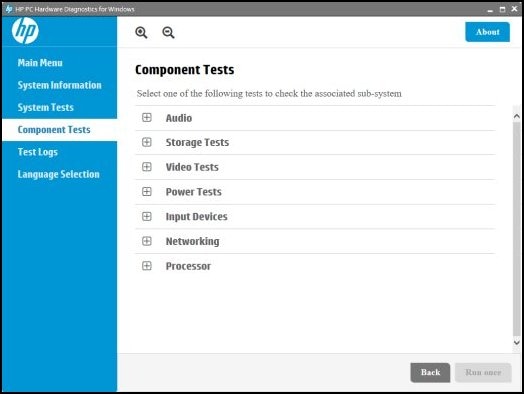
  2. On the main menu, click Component Tests.

  3. Click the plus sign next to each component to expand the selection.

    Your Component Tests menu might be different, depending on the components installed on your computer.

    Component tests menu

Refer to the document HP PCs - Testing for Hardware Failures for help.


Keep me posted. 


Please click “Accept as Solution” if you feel my post solved your issue, it will help others find the solution. Click the “Kudos/Thumbs Up" on the bottom right to say “Thanks” for helping!

TEJ1602
I am an HP Employee

† The opinions expressed above are the personal opinions of the authors, not of HP. By using this site, you accept the <a href="https://www8.hp.com/us/en/terms-of-use.html" class="udrlinesmall">Terms of Use</a> and <a href="/t5/custom/page/page-id/hp.rulespage" class="udrlinesmall"> Rules of Participation</a>.
-->