• ×
    Information
    Need Windows 11 help?
    Check documents on compatibility, FAQs, upgrade information and available fixes.
    Windows 11 Support Center.
  • post a message
  • ×
    Information
    Need Windows 11 help?
    Check documents on compatibility, FAQs, upgrade information and available fixes.
    Windows 11 Support Center.
  • post a message
Guidelines
Seize the moment! nominate yourself or a tech enthusiast you admire & join the HP Community Experts!
Check out our WINDOWS 11 Support Center info about: OPTIMIZATION, KNOWN ISSUES, FAQs, VIDEOS AND MORE.
HP Recommended
HP ENVY Notebook Y4G00PA#UUF
Microsoft Windows 10 (64-bit)

Hi HP Support 


the Problem in my Laptop System (HP ENVY Notebook) Product No (Y4G00PA#UUF) is that when i open youtube on google chrome so after 2 mint the system will restart and show troubleshoot blue screen .

1 REPLY 1
HP Recommended

@sp261 If the device is restarting on its own and you are unable to make a note of the blue screen stop error code/message as that would help us find a solution to the issue and resolve the same, once and for all, here's what you need to do:

  1. Turn off the computer and wait at least five seconds with the computer in a full off state.

  2. Turn on the computer and repeatedly press the F11 key, about once every second, until you see the Windows loading screen.

  3. If a language selection screen opens, select the language you want to use to continue.

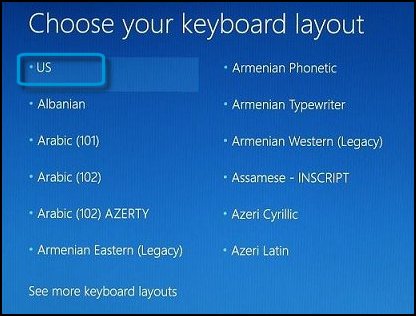
  4. On the Choose your keyboard layout screen, select the keyboard layout that matches your keyboard type.

    Keyboard layout selection screen

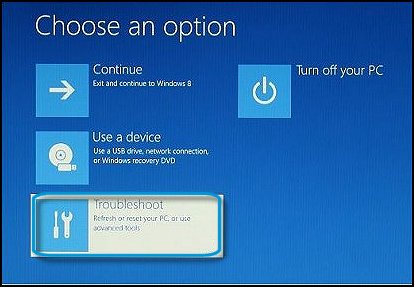
  5. On the Choose an option screen, click Troubleshoot.

    Choose an option: Troubleshoot

  6. Click Advanced options, then click Command Prompt.

  7. On the Command Prompt, type wmic reconverts set AutoReboot = False, then press Enter.

    Image: Type wmic reconverts set AutoReboot = False

  8. Close the Command Prompt window.

  9. On the Choose an option menu, select Continue to boot normally.

    Windows restarts with automatic restart disabled.

FOR DETAILS & FURTHER INSTRUCTIONS, USE THIS LINK: CLICK HERE, PERFORM STEP 1 & SKIP TO STEP 3 ONWARD

(By the end of this article all the issues should be resolved)


P.S: Welcome to HP Community 😉


Let me know how that pans out,

If you feel I was helpful, simply click on Accept as Solution to help the community grow,

That said, I will have someone follow-up on this to ensure you've been helped,

Just in case you don't get back to us, 

have a good day, ahead.


Riddle_Decipher
I am an HP Employee


Learning is a journey, not a destination.
Let's keep asking questions and growing together.
† The opinions expressed above are the personal opinions of the authors, not of HP. By using this site, you accept the <a href="https://www8.hp.com/us/en/terms-of-use.html" class="udrlinesmall">Terms of Use</a> and <a href="/t5/custom/page/page-id/hp.rulespage" class="udrlinesmall"> Rules of Participation</a>.