• ×
    Information
    Need Windows 11 help?
    Check documents on compatibility, FAQs, upgrade information and available fixes.
    Windows 11 Support Center.
  • post a message
  • ×
    Information
    Need Windows 11 help?
    Check documents on compatibility, FAQs, upgrade information and available fixes.
    Windows 11 Support Center.
  • post a message
Guidelines
Join the HP Community Solve‑a‑thon | Help Others & Share Your Solutions | Live on Zoom | 2:30 PM to 2:30 AM IST | Every Wednesday Click here to know more
Check out our WINDOWS 11 Support Center info about: OPTIMIZATION, KNOWN ISSUES, FAQs, VIDEOS AND MORE.
HP Recommended
2VY06PA#ACJ
Microsoft Windows 10 (64-bit)

my keyboard keys is not work correctly such as sound keys and window work very slowly plz solve this fast

1 REPLY 1
HP Recommended

@Suyash7898,


Welcome to the HP Support Community!


I recommend you follow the below steps and check if it helps.

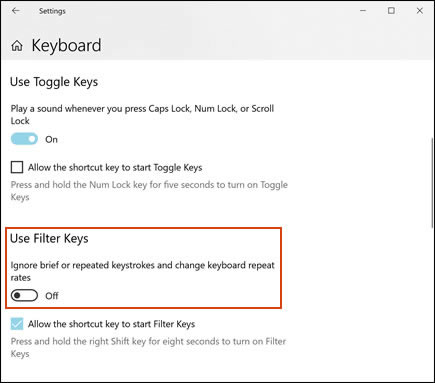
  1. In Windows, search for keyboard, and then open Ease of Access keyboard settings or Change how your keyboard works.

  2. Make sure the Filter Keys option is disabled.

    Turning off the Filter Keys

The keys should be more responsive.


If pressing any of the function keys does nothing while the rest of the keys are working properly, you need to replace the function key driver.

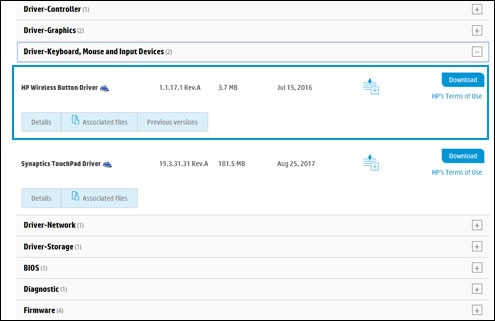
  1. Go to HP Customer Support - Software and Driver Downloads, identify your computer, and then look for keyboard drivers.

  2. Click Driver-Keyboard, Mouse, and Input Devices, and then select the HP Wireless Button Driver or HP Hotkey Support driver, depending on your operating system and notebook model.

    Locate the HP Wireless Driver Button Driver

  3. Download and install the driver.

    The function keys should now work.

Let me know how it goes and you have a great day!


If you wish to show appreciation for my efforts, mark my post as Accept as Solution. Your feedback counts!


Cheers!

The_Fossette
I am an HP Employee

† The opinions expressed above are the personal opinions of the authors, not of HP. By using this site, you accept the <a href="https://www8.hp.com/us/en/terms-of-use.html" class="udrlinesmall">Terms of Use</a> and <a href="/t5/custom/page/page-id/hp.rulespage" class="udrlinesmall"> Rules of Participation</a>.