-
×InformationNeed Windows 11 help?Check documents on compatibility, FAQs, upgrade information and available fixes.
Windows 11 Support Center. -
-
×InformationNeed Windows 11 help?Check documents on compatibility, FAQs, upgrade information and available fixes.
Windows 11 Support Center. -
- HP Community
- Notebooks
- Notebook Software and How To Questions
- Function keys

Create an account on the HP Community to personalize your profile and ask a question
08-19-2020 05:02 AM
Hello everyone, my function keys suddenly stopped working. I already tried to disabled then enabled the action keys again. But it doesn't work. My action keys are enabled but pressing the f11 key minimized and maximized a web browser if open, pressing f7 turn on caret browsing, things like that. I don't know what to do, please help me. Also my left ctrl key is now working, it's not stuck.
08-22-2020 04:07 AM
@hmmac, Welcome to the HP Support Community!
What model HP Computer are you using?
Refer to this document to know how to find the Product Name or Product Number.
Kindly refer to - How to Lock or Unlock the Fn (Function) Key
If the issue persists, use HP PC Hardware Diagnostics to complete functional test of the keyboard and identify any problems with the hardware.
-
Download the latest version of HP PC Hardware Diagnostics.
-
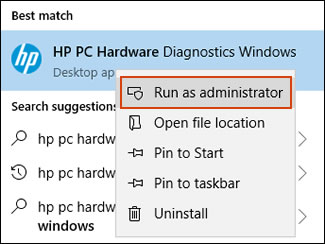
In Windows, search for and right-click HP PC Hardware Diagnostics for Windows, and then select Run as administrator.

-
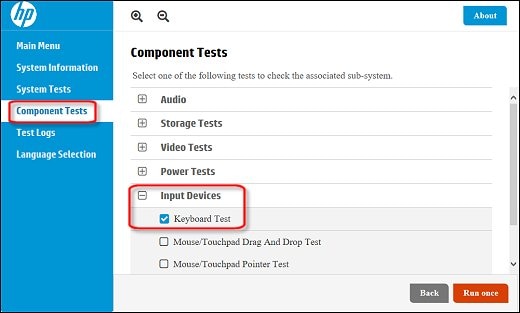
Click Component Tests, click Input Devices, and then select the Keyboard Test.

-
Click Run once to begin the test.
The test ends when you complete the tasks or after 3 minutes.
Hope this helps! Keep me posted.
Please click “Accept as Solution” if you feel my post solved your issue, it will help others find the solution.
Click the “Kudos, Thumbs Up" on the bottom right to say “Thanks” for helping!
Have a great day!
KUMAR0307
I am an HP Employee