• ×
    Information
    Need Windows 11 help?
    Check documents on compatibility, FAQs, upgrade information and available fixes.
    Windows 11 Support Center.
  • post a message
  • ×
    Information
    Need Windows 11 help?
    Check documents on compatibility, FAQs, upgrade information and available fixes.
    Windows 11 Support Center.
  • post a message
Guidelines
Join the HP Community Solve‑a‑thon | Help Others & Share Your Solutions | Live on Zoom | 2:30 PM to 2:30 AM IST | Every Wednesday Click here to know more
Check out our WINDOWS 11 Support Center info about: OPTIMIZATION, KNOWN ISSUES, FAQs, VIDEOS AND MORE.
HP Recommended

HP ENVY 13-ay1000 x360 Convertible PC suitable docking stations


1 REPLY 1
HP Recommended

Hi @Lajo1,


Welcome to the HP Support Community!


Thanks for reaching out!

We're thrilled to have the opportunity to assist you and provide a solution.


For your HP ENVY 13-ay1000 x360 Convertible PC, the most suitable docking stations are those that connect via USB-C with support for Power Delivery (PD) and DisplayPort Alt Mode 1.4. Since this model uses an AMD processor, it does not support Thunderbolt-specific features, but it is compatible with high-performance USB-C docks that can charge the laptop and output video simultaneously.

Recommended Docking Station

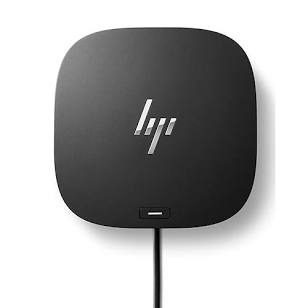
HP USB-C Dock G5

HP USB-C Dock G5

  • Why it's a fit: This is a top-tier choice specifically tested with the ENVY 13-ay series. It provides a single-cable solution for charging, high-speed data, and multiple monitor setups.
  • Features: Supports up to three displays, includes 4 USB-A ports, 1 USB-C port, and a Gigabit Ethernet port.

Your laptop's USB-C port is a "SuperSpeed USB Type-C 10Gbps" port that supports DisplayPort 1.4 and Power Delivery

  • Charging: Docks with at least 65W PD are recommended to ensure your laptop charges at full speed.
  • Displays: For best results with external monitors, look for docks that explicitly support DP 1.4 to achieve 4K resolution at 60Hz. 

How many external monitors do you plan to connect, and what resolution are they?

I hope this helps.


Take care and have an amazing day ahead! 🚀


Best regards,

I'm an HP Employee.


If this reply helped resolve your issue, please select the Accept as Solution as it helps others in the community quickly find the answer they’re looking for.


And if you found this reply helpful, clicking Yes below is a great way to let us know we’re providing the support you need, as it encourages us to keep improving and sharing helpful guidance.

† The opinions expressed above are the personal opinions of the authors, not of HP. By using this site, you accept the <a href="https://www8.hp.com/us/en/terms-of-use.html" class="udrlinesmall">Terms of Use</a> and <a href="/t5/custom/page/page-id/hp.rulespage" class="udrlinesmall"> Rules of Participation</a>.