
-
×InformationNeed Windows 11 help?Check documents on compatibility, FAQs, upgrade information and available fixes.
Windows 11 Support Center. -
-
×InformationNeed Windows 11 help?Check documents on compatibility, FAQs, upgrade information and available fixes.
Windows 11 Support Center. -
- HP Community
- Desktops
- Desktop Audio
- Re: lost all sound

Create an account on the HP Community to personalize your profile and ask a question
Your account also allows you to connect with HP support faster, access a personal dashboard to manage all of your devices in one place, view warranty information, case status and more.
Check out our WINDOWS 11 Support Center info about: OPTIMIZATION, KNOWN ISSUES, FAQs, VIDEOS AND MORE.

It has been a while since anyone has replied. Simply ask a new question if you would like to start the discussion again.

08-17-2020 01:02 PM
 HP Recommended
Product: Pavilion AIO XA0035na
Operating System: Microsoft Windows 10 (64-bit)
Pavilion AIO XA0035na, windows 10 64bit
lost all sound, run the smart repair tools no hardware or software issues pass all diags but then Audio device not responding. stopped the drivers restarted the drivers, check for any updates all up to date from windows and from HP.
connected a pair of blue tooth headphones and they work fine but no external speakers sounds what so ever.
Any help please?
6 REPLIES 6


08-20-2020 07:10 AM
HP Recommended
Welcome to HP Community
I have gone through your Post and would like to help
I suggest you download and run the HP Support Assistant from this Link: https://www8.hp.com/us/en/campaigns/hpsupportassistant/hpsupport.html?jumpid=va_r602_us/en/any/psg/p...
HPSA will automatically search for all the latest drivers for your Notebook
-
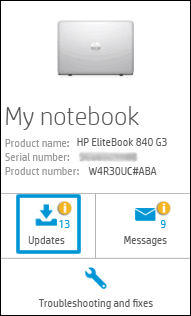
Click My devices in the top menu, and then click Updates in the My PC or My notebook pane.
-
Click Check for updates and messages to scan for new updates.

-
Review the list of updates. Updates with a yellow information icon are recommended. Updates with a blue information icon are optional.
-
Click the update name for a description, version number, and file size.
-
Select the box next to any updates you want to install, and then click Download and install.
Also ensure Windows is up to date.
Select the Start button, and then go to Settings > Update & security > Windows Update , and select Check for updates. If Windows Update says your device is up to date, you have all the updates that are currently available
If the issue persists please run an Audio Test
- Hold the power button for at least five seconds to turn off the Notebook.
- Turn on the computer and immediately press Esc repeatedly, about once every second.
- When the menu appears, press the F2 key.
- On the main menu, click Component Tests and Audio
Keep me posted how it goes
Thank you and have a wonderful day 😊
If the information I've provided was helpful, give us some reinforcement by clicking the "Solution Accepted" on this Post and it will also help other community members with similar issue.
KrazyToad
I Am An HP Employee
08-20-2020 07:37 AM
HP Recommended
thank you so much but managed to get it resolved with HP support via messenger
had to delete sound sound drivers and install different one problem was known issue with latest windows 10 update
clash between realtek and intel drivers I think
thank you
08-24-2020 12:27 AM
HP Recommended
Would you be able to advise on how you did this, including sourcing the replacement drivers? My Pavillion xa0002a lost its sound shortly after a Win10 update. I was using an audio editor, and upon closing it down, I received the dreaded blue screen of "Windows has encountered a system error and must restart". or words to that effect. The sound disappeared upon restarting. This was about a day after the latest Win10 update.
08-24-2020 04:21 AM
HP Recommended
Hi Yes
I use the HP Face book support messenger its a great service and quick
the driver required was HP Realtek SP91516
you have to delete and uninstall the intel and Realtek drivers reboot the machine, then install the above new driver and mine was sorted, it is a known issue with the windows 10 update
Hope this helps
08-24-2020 07:36 PM - edited 08-24-2020 09:39 PM
HP Recommended
Thanks, Duncan18, for your quick reply.
It seems from the number of posts re this problem, many are seeing this issue, and a rapid way of disseminating the fix would be highly desirable.
I don't have a Facebook account, and am very unlikely to want one. So I looked up HP Support drivers website and was able to find 3 updates for my Realtek audio for Windows 10. The listings, however, don't display the HP SP numbers, only the driver version numbers. The site does, however, use a "download and install assistant", which takes a lot of hassle out of the process.
To cut a long story short, I tried all 3 drivers, and it was only the last, and oldest version dated 2018/08/10 that worked. The driver version number is 6.0.1.8504, and the file downloaded is SP91516. I found that it was necessary to uninstall and remove the current Realtek audio driver using Device Manager to enable this older version to be installed - rebooting after downloading and installing using the website's assistant was not enough as a later version of the driver, if present, will be loaded.
I hope this addition to your post will help other users with this problem. Note: using the HP Support Assistant will install the latest (2020/06/01) version of driver, which fails with the latest Win10 updates.

Be alert for scammers posting fake support phone numbers and/or email addresses on the community.
If you think you have received a fake HP Support message, please report it to us by clicking on "Flag Post".
† The opinions expressed above are the personal opinions of the authors, not of HP. By using this site, you accept the Terms of Use and Rules of Participation.


Didn't find what you were looking for?
Ask the community
† The opinions expressed above are the personal opinions of the authors, not of HP. By using this site, you accept the <a href="https://www8.hp.com/us/en/terms-of-use.html" class="udrlinesmall">Terms of Use</a> and <a href="/t5/custom/page/page-id/hp.rulespage" class="udrlinesmall"> Rules of Participation</a>.