
-
×InformationNeed Windows 11 help?Check documents on compatibility, FAQs, upgrade information and available fixes.
Windows 11 Support Center. -
-
×InformationNeed Windows 11 help?Check documents on compatibility, FAQs, upgrade information and available fixes.
Windows 11 Support Center. -
- HP Community
- Notebooks
- Notebook Software and How To Questions
- Software/driver update issue using HP support assistant

Create an account on the HP Community to personalize your profile and ask a question
Your account also allows you to connect with HP support faster, access a personal dashboard to manage all of your devices in one place, view warranty information, case status and more.
Check out our WINDOWS 11 Support Center info about: OPTIMIZATION, KNOWN ISSUES, FAQs, VIDEOS AND MORE.

It has been a while since anyone has replied. Simply ask a new question if you would like to start the discussion again.

04-27-2020 09:23 PM
 HP Recommended
Product: 15q-by002ax
Operating System: Microsoft Windows 10 (64-bit)
I have an issue for updating drivers and software using HP support assistant.There is showing in display screen that 4 nos updates are pending.But when I start to update all installations fail every time.I have updated HP support assistant software several times but nothing changed.
I am experiencing this issue since 2-3 months.No cooperations received for HP customer support also.
Kindly share your views.
9 REPLIES 9


05-04-2020 05:23 PM
HP Recommended
@Subhabrata1 Did you know that HPSA redirects application updates based on model-series and is not specific to your computer?
(Basically, the application gets updates based on the entire series, is not specific to your serial number, hence there are certain updates that can be skipped)
Although, if your applications aren't working and the updates are necessary, make sure you download the latest version available for HPSA from the Official HPSA website.
If yes, please follow the below steps to ensure the options are not set to Never :
- Open HP Support Assistant and click the Settings button.
- On the Health Analysis tab, select "Every day or week" from the Frequency drop-down list, and then click Save.
- Click the Tune up tab, select the "your preference" from the Frequency drop-down list, and then click Save.
- Restart the computer and try again.
FOR DETAILS & FURTHER INSTRUCTIONS, USE THIS LINK: CLICK HERE
(By the end of this article all the issues should be resolved)
P.S: Welcome to HP Community 😉
Keep us posted,
If you would like to thank us for our efforts to help you,
Give us a virtual high-five by clicking the 'Thumbs Up' icon below, followed by clicking on the "Accept as solution" on this post,
Have a great day!
Riddle_Decipher
I am an HP Employee
Learning is a journey, not a destination.
Let's keep asking questions and growing together.

05-05-2020 09:36 AM
HP Recommended
@Subhabrata1 If none of that worked, here's what I suggest you do:
-
In Windows, search for an open Uninstall a program.
-
On the Programs and Features window, select HP Support Assistant, then click Uninstall.
Figure : Uninstall HP Support Assistant

-
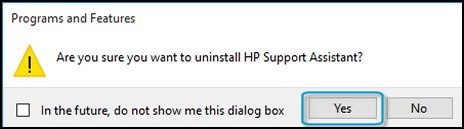
Click Yes on the Programs and Features screen to confirm you want to uninstall HP Support Assistant.
Figure : Uninstall confirmation
-
Restart your computer to complete the process.
Once done, download a fresh copy of the software to resolve the issue: click here for details
If you wish to thank me for my efforts, you could click on "Accept as solution" on my post as the solution should help others too.
Riddle_Decipher
I am an HP Employee
Learning is a journey, not a destination.
Let's keep asking questions and growing together.
05-07-2020 12:57 PM - edited 05-07-2020 12:58 PM
HP Recommended
@Subhabrata1 What do you mean, you couldn't uninstall it? or you did but when reinstalling it, the issue persists, could you elaborate?
Also, if re-installation was done and yet the issue persists, please create a new user account: click here for details and let me know if that helps.
Keep me posted,
Riddle_Decipher
I am an HP Employee
Learning is a journey, not a destination.
Let's keep asking questions and growing together.
05-08-2020 09:41 PM
HP Recommended
Firstly I have unistalled fully
Secondly Installed again
But nothing resolved
Again my main issue persists
i.e updates showing but bot installing.
I could not understand the reason for another user account.Do you mean for windows user account?it is not possible as it is related with other.
hope you will guide for exact solution.
05-11-2020 11:38 AM
HP Recommended
@Subhabrata1 Yes, create a new user account, as the HP support assistant may not be working on your current account due to a glitch or a compatibility issue with another software installed on the device, if you can temporarily create a new user account with admin rights and check if it works on the new account, we can narrow the issue down to understanding if its either the software or the account/windows that's causing the issue.
I hope you understand,
If you wish to thank me for my efforts, you could click on "Accept as solution" on my post as the solution should help others too.
Riddle_Decipher
I am an HP Employee
Learning is a journey, not a destination.
Let's keep asking questions and growing together.
05-12-2020 09:48 AM
HP Recommended
@Subhabrata1 If none of that worked, the only other thing to do is either to use the HP website to download the drivers instead of the HP Support Assistant, or reset the windows using the steps mentioned here to resolve any software glitches that could be causing the issue.
Keep us posted.
Riddle_Decipher
I am an HP Employee
Learning is a journey, not a destination.
Let's keep asking questions and growing together.

Be alert for scammers posting fake support phone numbers and/or email addresses on the community.
If you think you have received a fake HP Support message, please report it to us by clicking on "Flag Post".
† The opinions expressed above are the personal opinions of the authors, not of HP. By using this site, you accept the Terms of Use and Rules of Participation.


Didn't find what you were looking for?
Ask the community
† The opinions expressed above are the personal opinions of the authors, not of HP. By using this site, you accept the <a href="https://www8.hp.com/us/en/terms-of-use.html" class="udrlinesmall">Terms of Use</a> and <a href="/t5/custom/page/page-id/hp.rulespage" class="udrlinesmall"> Rules of Participation</a>.