• ×
    Information
    Need Windows 11 help?
    Check documents on compatibility, FAQs, upgrade information and available fixes.
    Windows 11 Support Center.
  • post a message
  • ×
    Information
    Need Windows 11 help?
    Check documents on compatibility, FAQs, upgrade information and available fixes.
    Windows 11 Support Center.
  • post a message
Guidelines
Troubleshooting black screen issues on HP Notebooks: Click here to view the instructions!
HP Recommended
HP Pavilion 10 TS Notebook PC
Microsoft Windows 10 (64-bit)

This is a follow up to a query I raised in late 2016. The problem is described in "10-e011sa Realtek display driver" but a brief description follows. 


The problem was caused by somebody (HP/AMD/Microsoft) setting an incorrect Display driver for the HP10-e011sa and Windows10 continually tried to update itself to what it thought was the correct driver. In the process of updating it made the notebook almost unusable and working very, very, very slowly indeed. Now that I have the correct (Microsoft basic display driver from 2006) driver installed the machine works very well indeed. Neither the Device Manager nor the Find new hardware options were of any use as all they did was reinstall the incorrect driver which reinstalled the problem. 


However, following Microsoft's latest Windows 10 update last Tuesday Wednesday (15/April/2020) the machine is working as it is supposed to. No hang-ups nor pauses while it tries to work out what to do next. My principal complaint is that I now have a fairly fast notebook from 2013 with only 2Gb of memory struggling to run 2020 software and OS. As a codocil; the machine tries to tell me that the Graphics driver is incorrectly installed every time I switch it on but, as far as I can see, all display functionality is as per original specification, including the external HDMI which the Microsoft2006 couldn't manage. Well done HP/AMD/Microsoft for the solution even if it was a bit late.

1 REPLY 1
HP Recommended

@Graywallis Welcome to HP Community!


I understand that you are getting the  Graphics driver is incorrectly installed message while turn on the laptop.


Do not worry. I will try to fix the issue.


I suggest you download and run the HP Support Assistant from this Link: https://www8.hp.com/us/en/campaigns/hpsupportassistant/hpsupport.html?jumpid=va_r602_us/en/any/psg/p...


HPSA will automatically search for all the latest drivers for your Notebook


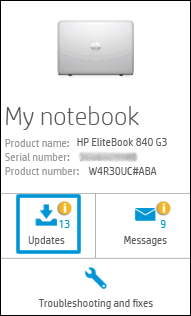
  1. Click My devices in the top menu, and then click Updates in the My PC or My notebook pane.

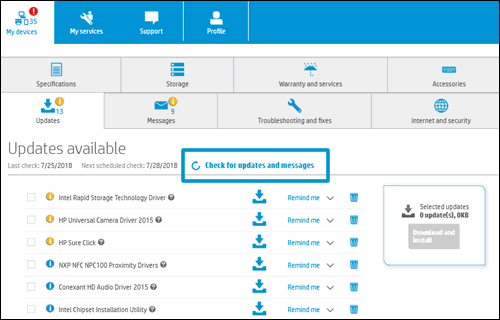
  1. Click Check for updates and messages to scan for new updates.

  1. Review the list of updates. Updates with a yellow information icon are recommended. Updates with a blue information icon are optional.
  2. Click the update name for a description, version number, and file size.
  3. Select the box next to any updates you want to install, and then click Download and install.

Also, ensure Windows is up to date.


I request you to use the AMD autodetect software from AMD and install it on the PC, which will detect the video card and will download the suitable driver for it to work on the PC.


http://support.amd.com/en-us/download/auto-detect-tool


The above link is 3rd party and is not owned by HP, I've posted this only so that I may help you resolve this issue by going beyond my support boundaries, please ignore the ads and take only the free suggestions


Keep us posted,

If you would like to thank us for our efforts to help you, 


Give us a virtual high-five by clicking the 'Thumbs Up' icon below, followed by clicking on the "Accept as solution" on this post, 


Have a great day!


† The opinions expressed above are the personal opinions of the authors, not of HP. By using this site, you accept the <a href="https://www8.hp.com/us/en/terms-of-use.html" class="udrlinesmall">Terms of Use</a> and <a href="/t5/custom/page/page-id/hp.rulespage" class="udrlinesmall"> Rules of Participation</a>.