-
×InformationNeed Windows 11 help?Check documents on compatibility, FAQs, upgrade information and available fixes.
Windows 11 Support Center. -

-
×InformationNeed Windows 11 help?Check documents on compatibility, FAQs, upgrade information and available fixes.
Windows 11 Support Center. -
- HP Community
- Notebooks
- Notebook Video, Display and Touch
- Broken Display

Create an account on the HP Community to personalize your profile and ask a question
06-02-2022 06:43 AM
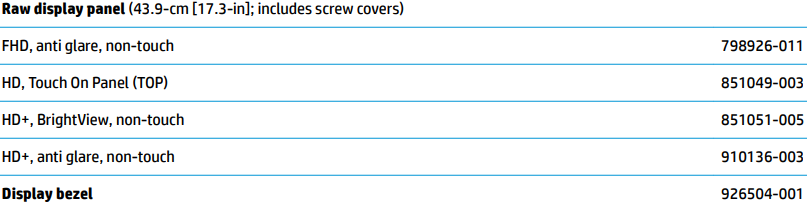
Looking to replace the display on my HP Notebook 17-bs072nr. Can anyone advise as to whether 851051-005 is the correct PN for this application?
Solved! Go to Solution.
Accepted Solutions
06-08-2022 02:55 PM
Thank you for posting back.
Please refer to the Display assembly parts: http://h10032.www1.hp.com/ctg/Manual/c05963248.pdf
If you still need additional technical assistance that can be better provided through one-on-one interaction, then you can contact our HP Support team.
Hope this helps! Keep me posted for further assistance.
Please click “Accept as Solution” if you feel my post solved your issue, it will help others find the solution.
ECHO_LAKE
I am an HP Employee
06-06-2022 12:56 PM
@Slowrunna @BlossKP
Thank you for posting on the HP Support Community.
Don't worry as I'll be glad to help,
I understand your HP notebook display is broken and in order to fix this issue, the complete display assembly needs to be replaced.
I'm sending out a private message to assist you with the next course of action. Please check your Private message icon on the upper right corner of your HP Community profile Next, to your profile Name, you should see a little blue envelope, please click on it or simply click on this link: https://h30434.www3.hp.com/t5/notes/privatenotespage
Hope this helps! Keep me posted for further assistance.
Please click “Accept as Solution” if you feel my post solved your issue, it will help others find the solution. Click the “Kudos, Thumbs Up" on the bottom right to say “Thanks” for helping!
ECHO_LAKE
I am an HP Employee
06-08-2022 02:55 PM
Thank you for posting back.
Please refer to the Display assembly parts: http://h10032.www1.hp.com/ctg/Manual/c05963248.pdf
If you still need additional technical assistance that can be better provided through one-on-one interaction, then you can contact our HP Support team.
Hope this helps! Keep me posted for further assistance.
Please click “Accept as Solution” if you feel my post solved your issue, it will help others find the solution.
ECHO_LAKE
I am an HP Employee