• ×
    Information
    Need Windows 11 help?
    Check documents on compatibility, FAQs, upgrade information and available fixes.
    Windows 11 Support Center.
  • post a message
  • ×
    Information
    Need Windows 11 help?
    Check documents on compatibility, FAQs, upgrade information and available fixes.
    Windows 11 Support Center.
  • post a message
Guidelines
Join the HP Community Solve‑a‑thon | Help Others & Share Your Solutions | Live on Zoom | 2:30 PM to 2:30 AM IST | Every Wednesday Click here to know more
HP Recommended
Omen 15"
Microsoft Windows 10 (64-bit)

Suddenly, my Omen stopped using the Nvidia graphics card, and cannot find it either from Nvidia graphics controller, HP drivers, Device Manager, or anything else. Its like the physical card is no longer present.


Running HPs diagnostics tool it cancels the video test with this log-file:


LogMessage Debug -ActivateDiscreteGPU=false
 

Windows is not able to reset system (it fails and makes no changes. ) Resetting BIOS didn´t help either.)

1 REPLY 1
HP Recommended

@Matjubi 

Hello,

What is the exact model of your laptop (e.g. 5ES85EA)?
To find this product number P/N: this document.

Please go to the Using Recovery Manager to Restore Software and Drivers (Windows 10) section to reinstall the NVIDIA graphics card driver.

If the issue persists,please install the NVIDIA graphics card driver since the site Nvidia below.

http://www.nvidia.com/Download/index.aspx

If the issue continue, please perform a system test as follows:

  1. Turn on the computer and immediately press Esc repeatedly, about once every second. When the menu appears, press the F2 key.
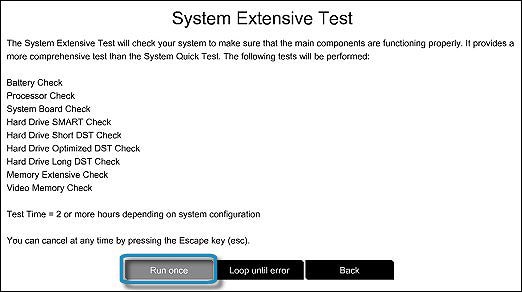
  2. From the main menu, click System Tests, then click Extensive Test.
  3. Click Run once.
    While the test is running, the time remaining and test result for each component displays on the screen. The test can take 2 or more hours to complete.
  4. If a component fails a test, write down the Failure ID (24-digit code) to pass it on to us in your next response. This information is also available in the Test Logs section of the main menu.
 

In case of need, do not hesitate to contact us.

Best regards,:Wink:


I'm not an HP employee. Did this message answer your question? Include it below as an Accept As Solution! Did you find this message useful?  Click on the thumbs up set to give a Compliment! Follow us on Facebook Assistance customers HP.

† The opinions expressed above are the personal opinions of the authors, not of HP. By using this site, you accept the <a href="https://www8.hp.com/us/en/terms-of-use.html" class="udrlinesmall">Terms of Use</a> and <a href="/t5/custom/page/page-id/hp.rulespage" class="udrlinesmall"> Rules of Participation</a>.