
-
×InformationNeed Windows 11 help?Check documents on compatibility, FAQs, upgrade information and available fixes.
Windows 11 Support Center. -
-
×InformationNeed Windows 11 help?Check documents on compatibility, FAQs, upgrade information and available fixes.
Windows 11 Support Center. -
- HP Community
- Notebooks
- Notebook Video, Display and Touch
- Re: Digi Pens

Create an account on the HP Community to personalize your profile and ask a question
Your account also allows you to connect with HP support faster, access a personal dashboard to manage all of your devices in one place, view warranty information, case status and more.

It has been a while since anyone has replied. Simply ask a new question if you would like to start the discussion again.

02-06-2019 06:23 AM
 HP Recommended
Product: Pavilion X360 13-s150sa
Hi, Could someone which digi pen is compatible with the 'x360 13-s150sa? It clearly states in the notebooks information that it has pen and touch support but I'm not clear if that means a digi pen or one of those floppy topped pens. I'm really hoping it means a digi pen. Thanks.
Solved! Go to Solution.
1 ACCEPTED SOLUTION
Accepted Solutions


02-06-2019 09:43 AM
HP Recommended
I don't recognize "floppy top pen". Not even a clue. Smiling.
I believe you are seeking a digital stylus for your notebook.
Found two candidates - see below...
Active Stylus - Compatibility Document
Search the document for a compatible stylus:
HP PCs - Touchscreen Compatibility with Pen and Stylus
- If there is an HP Active Stylus available for your model, it should be included in the document.
- Pen(s) compatible with your computer are marked with an “X” to the right of your computer model, in the column(s) under the Pen name / description(s).
- Additional information can sometimes be found in Advisory Documents for your computer.
- The document is updated as new information becomes available.
Two stylus pens found for this model
J4R51AA
K8P73AA
Partial Excerpt from the document
Model name | HP Active Pen (Synaptics) J4R51AA (CAN/ENG, APJ) SPS: 773175-001 | HP Active Stylus (Wacom) T5E12AA (CAN/ENG, APJ) SPS: 834590-001 | HP Pro Tablet Active Pen (Synaptics) K8P73AA SPS: 798051-001 |
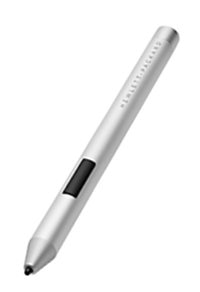 | 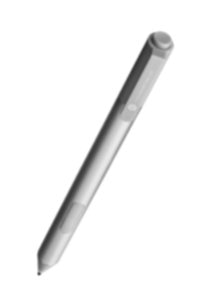 | 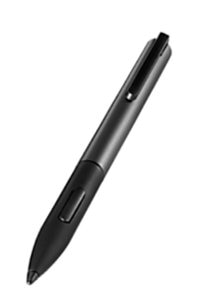 | |
Pavilion x360 13-s0xx | x | x | |
Pavilion x360 13-s1xx | x | x |
Reference and Resources – Places to find help and learn about your Device
Device Homepage
Drivers / Software and BIOS, Videos, Bulletins/Notices, How-to, Troubleshooting, Manuals, Product Information, more
HP Pavilion x360 - 13-s150sa (ENERGY STAR)
Thank you for participating in the HP Community Forum.
We are a world community of HP enthusiasts dedicated to supporting HP technology.
Click Thumbs Up on a post to say Thank You!
Answered? Click post "Accept as Solution" to help others find it.
Dragon-Fur
4 REPLIES 4
02-06-2019 09:43 AM
HP Recommended
I don't recognize "floppy top pen". Not even a clue. Smiling.
I believe you are seeking a digital stylus for your notebook.
Found two candidates - see below...
Active Stylus - Compatibility Document
Search the document for a compatible stylus:
HP PCs - Touchscreen Compatibility with Pen and Stylus
- If there is an HP Active Stylus available for your model, it should be included in the document.
- Pen(s) compatible with your computer are marked with an “X” to the right of your computer model, in the column(s) under the Pen name / description(s).
- Additional information can sometimes be found in Advisory Documents for your computer.
- The document is updated as new information becomes available.
Two stylus pens found for this model
J4R51AA
K8P73AA
Partial Excerpt from the document
Model name | HP Active Pen (Synaptics) J4R51AA (CAN/ENG, APJ) SPS: 773175-001 | HP Active Stylus (Wacom) T5E12AA (CAN/ENG, APJ) SPS: 834590-001 | HP Pro Tablet Active Pen (Synaptics) K8P73AA SPS: 798051-001 |
| | | |
Pavilion x360 13-s0xx | x | x | |
Pavilion x360 13-s1xx | x | x |
Reference and Resources – Places to find help and learn about your Device
Device Homepage
Drivers / Software and BIOS, Videos, Bulletins/Notices, How-to, Troubleshooting, Manuals, Product Information, more
HP Pavilion x360 - 13-s150sa (ENERGY STAR)
Thank you for participating in the HP Community Forum.
We are a world community of HP enthusiasts dedicated to supporting HP technology.
Click Thumbs Up on a post to say Thank You!
Answered? Click post "Accept as Solution" to help others find it.
Dragon-Fur
02-06-2019 11:41 AM
HP Recommended
Hi Dragon-fur, Thanks ever so much for that, I've ordered one and discovered that it is incompatible. I thought it was and couldn't understand why it didn't work but after some major detective work I've discovered it's the wrong pen. I was unsure if there was a compatible pen. But now I know there is I'm able to ask for an exchange. Thank you. (floppy top pen are those that are used on mobile phones, they have the soft rubber top and are good for nothing much other than selecting apps LOL)
02-06-2019 11:48 AM
HP Recommended
You are welcome!
Ah! Floppy top = Passive Pen
Smiling.
Thank you for participating in the HP Community Forum.
We are a world community of HP enthusiasts dedicated to supporting HP technology.
Click Thumbs Up on a post to say Thank You!
Answered? Click post "Accept as Solution" to help others find it.
Dragon-Fur

Be alert for scammers posting fake support phone numbers and/or email addresses on the community.
If you think you have received a fake HP Support message, please report it to us by clicking on "Flag Post".
† The opinions expressed above are the personal opinions of the authors, not of HP. By using this site, you accept the Terms of Use and Rules of Participation.


Didn't find what you were looking for?
Ask the community
† The opinions expressed above are the personal opinions of the authors, not of HP. By using this site, you accept the <a href="https://www8.hp.com/us/en/terms-of-use.html" class="udrlinesmall">Terms of Use</a> and <a href="/t5/custom/page/page-id/hp.rulespage" class="udrlinesmall"> Rules of Participation</a>.