• ×
    Information
    Need Windows 11 help?
    Check documents on compatibility, FAQs, upgrade information and available fixes.
    Windows 11 Support Center.
  • post a message
  • ×
    Information
    Need Windows 11 help?
    Check documents on compatibility, FAQs, upgrade information and available fixes.
    Windows 11 Support Center.
  • post a message
Guidelines
Troubleshooting black screen issues on HP Notebooks: Click here to view the instructions!
HP Recommended
HP 15 Notebook
Microsoft Windows 10 (64-bit)

The screen display is so washed out it is almost impossible to read.  My resolution is set to the recommended 1366 x 768, and the brightness is at the lowest setting.  I've tried updating the drivers, but nothing seems to help.  Any suggestions?


3 REPLIES 3
HP Recommended

@Pebblesbuff Welcome to HP Community!


I understand that you are facing issues with screen display issues.


Do not worry. I will try to fix the issue.


I suggest you download and run the HP Support Assistant from this Link: https://www8.hp.com/us/en/campaigns/hpsupportassistant/hpsupport.html?jumpid=va_r602_us/en/any/psg/p...


HPSA will automatically search for all the latest drivers for your Notebook


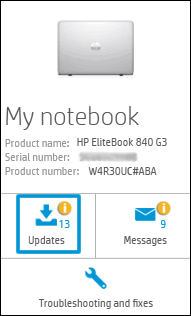
  1. Click My devices in the top menu, and then click Updates in the My PC or My notebook pane.

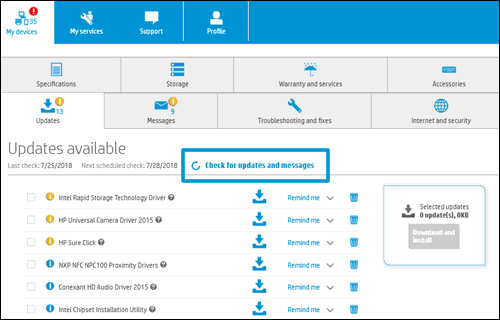
  1. Click Check for updates and messages to scan for new updates.

  1. Review the list of updates. Updates with a yellow information icon are recommended. Updates with a blue information icon are optional.
  2. Click the update name for a description, version number, and file size.
  3. Select the box next to any updates you want to install, and then click Download and install.

Also, ensure Windows is up to date.


If the issue still persists, please try creating a new user account on your computer.


Go to http://hp.care/2dWJKgW  and follow the steps to create a new user account.


Keep us posted,

If you would like to thank us for our efforts to help you, 


Give us a virtual high-five by clicking the 'Thumbs Up' icon below, followed by clicking on the "Accept as solution" on this post, 


Have a great day!

HP Recommended

Thanks, but I did that.  What fixed it was updating and resetting the Intel Graphics drivers and software.

HP Recommended

@Pebblesbuff


We are glad to know that the issue is resolved.


In the future, if you have any other concerns. Please get back to us. We will assist you.


Have a nice day!!

† The opinions expressed above are the personal opinions of the authors, not of HP. By using this site, you accept the <a href="https://www8.hp.com/us/en/terms-of-use.html" class="udrlinesmall">Terms of Use</a> and <a href="/t5/custom/page/page-id/hp.rulespage" class="udrlinesmall"> Rules of Participation</a>.