• ×
    Information
    Need Windows 11 help?
    Check documents on compatibility, FAQs, upgrade information and available fixes.
    Windows 11 Support Center.
  • post a message
  • ×
    Information
    Need Windows 11 help?
    Check documents on compatibility, FAQs, upgrade information and available fixes.
    Windows 11 Support Center.
  • post a message
Guidelines
Seize the moment! nominate yourself or a tech enthusiast you admire & join the HP Community Experts!
HP Recommended
Pavilion dv7
Microsoft Windows 10 (64-bit)

Hi, i need your help guys. Here is my problem:

When I turn on my laptop it doesn't anything no even bios. I already tried everything from this forum; unplugging the laptop and bios the battery, pressing buttons before turning it on, unpluggin and pluggin rams and hdd.

Strange things happened trying to fix it:

-If I plug just one memory ram the laptop turns on for few seconds and then it tuns off. I have 2 memory ram ( 4 gb and 2 gb)

-Bought 2 new memory ram (2 of 4gb) same behavior

-Last i did was to unplug the bios battery and leave it for 6 months (I gave up trying to fix it). Turned it on yesterday and the everything worked, then restarted it due to windows updates and back to the same issue.


Please help me. TT

Thanks

Regards


1 REPLY 1
HP Recommended

@Joseluislee


Welcome to the HP support community.


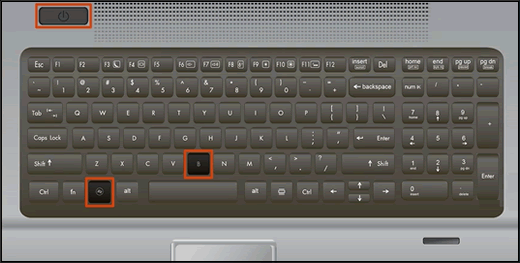
Recover the BIOS using a keypress combination

  1. Turn off the computer, and then connect the power cord.

  2. Press and hold the Windows key and the B key at the same time, and then press and hold the Power button for 2 to 3 seconds.

    Keyboard highlighting the key presses for BIOS recovery

  3. Release the Power button but continue pressing the Windows and B keys. You might hear a series of beeps.

Refer this HP document for more assistance:- Click here


I hope that helps.

To thank me for my efforts to help you, please mark my post as an accepted solution so that it benefits several others.

Cheers.

Sandytechy20
I am an HP Employee

† The opinions expressed above are the personal opinions of the authors, not of HP. By using this site, you accept the <a href="https://www8.hp.com/us/en/terms-of-use.html" class="udrlinesmall">Terms of Use</a> and <a href="/t5/custom/page/page-id/hp.rulespage" class="udrlinesmall"> Rules of Participation</a>.