• ×
    Information
    Need Windows 11 help?
    Check documents on compatibility, FAQs, upgrade information and available fixes.
    Windows 11 Support Center.
  • post a message
  • ×
    Information
    Need Windows 11 help?
    Check documents on compatibility, FAQs, upgrade information and available fixes.
    Windows 11 Support Center.
  • post a message
Guidelines
Seize the moment! nominate yourself or a tech enthusiast you admire & join the HP Community Experts!
HP Recommended
Envy 17
Microsoft Windows 10 (64-bit)

I'd be very grateful for help. The support assistant says there is an update to the Intel graphics driver. When I go through the installation process is doesn't work. I've also tried going directly through the Intel site and manually trying the installation with no luck.


I am currently getting error messages from Adobe that my Intel driver needs to be updated.

1 REPLY 1
HP Recommended

@Malcolm91 I suggest you create a new use account and check if that works, if that doesn't help, you may want to follow the below steps to uninstall the program, and then install a fresh copy using this link: click here for details.

  1. In Windows, search for an open Uninstall a program.

  2. On the Programs and Features window, select HP Support Assistant, then click Uninstall.

    Figure : Uninstall HP Support Assistant

    Uninstall screen from the Control Panel with HP Support Assistant highlighted
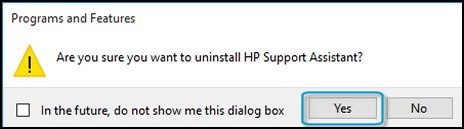
  3. Click Yes on the Programs and Features screen to confirm you want to uninstall HP Support Assistant.

    Figure : Uninstall confirmation

    Confirmation screen to uninstall HP Support Assistant with Yes selected
  4. Restart your computer to complete the process.

P.S: Welcome to HP Community 😉


Keep us posted,

If you would like to thank us for our efforts to help you, 

Give us a virtual high-five by clicking the 'Thumbs Up' icon below, followed by clicking on the "Accept as solution" on this post, 

Have a great day!

Riddle_Decipher
I am an HP Employee


Learning is a journey, not a destination.
Let's keep asking questions and growing together.
† The opinions expressed above are the personal opinions of the authors, not of HP. By using this site, you accept the <a href="https://www8.hp.com/us/en/terms-of-use.html" class="udrlinesmall">Terms of Use</a> and <a href="/t5/custom/page/page-id/hp.rulespage" class="udrlinesmall"> Rules of Participation</a>.