• ×
    Information
    Need Windows 11 help?
    Check documents on compatibility, FAQs, upgrade information and available fixes.
    Windows 11 Support Center.
  • post a message
  • ×
    Information
    Need Windows 11 help?
    Check documents on compatibility, FAQs, upgrade information and available fixes.
    Windows 11 Support Center.
  • post a message
Guidelines
Join the HP Community Solve‑a‑thon | Help Others & Share Your Solutions | Live on Zoom | 2:30 PM to 2:30 AM IST | Every Wednesday Click here to know more
HP Recommended
24-b237c
Microsoft Windows 10 (64-bit)

I have an HP Pavillion All-in-One that came with a touch screen. A while back my touch screen stopped working properly so I looked online and some articles told me to go to my control panel and uninstall my HID-Compliant Touch Screen. But now, my touch screen doesn't work at all and my device specifications say that I have no pen or touch input available. How can I reinstall the HID-Compliant Touch Screen? 

1 REPLY 1
HP Recommended

@Nefeliii

Thank you for posting on HP Support Community.


Don't worry as I'll be glad to help, I have a few troubleshooting steps we could try to fix the issue:  

Your touch screen might not respond because it is not enabled or needs to be reinstalled. Use Device Manager to enable and reinstall the touch screen driver.

  1. In Windows, search for and open Device Manager.

  2. Expand the Human Interface Devices list.

  3. Right-click the touch screen device, and then click Enable, if possible. If the Enable option does not display, continue to the next step.

    Enable HID-compliant touch screen in Device Manager

  4. Tap the screen to see if it responds. If it does not, continue with these steps.

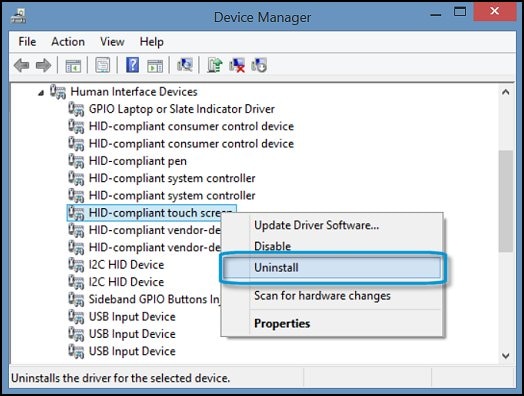
  5. Right-click the touch screen device, and then click Uninstall.

    Uninstall HID-compliant touch screen in Device Manager

  6. Restart the computer to reinstall the touch screen driver.

  7. Tap the screen to see if it responds. 

Hope this helps! Keep me posted for further assistance.
Please click “
Accept as Solution” if you feel my post solved your issue, it will help others find the solution.

ECHO_LAKE
I am an HP Employee

† The opinions expressed above are the personal opinions of the authors, not of HP. By using this site, you accept the <a href="https://www8.hp.com/us/en/terms-of-use.html" class="udrlinesmall">Terms of Use</a> and <a href="/t5/custom/page/page-id/hp.rulespage" class="udrlinesmall"> Rules of Participation</a>.