-
×InformationNeed Windows 11 help?Check documents on compatibility, FAQs, upgrade information and available fixes.
Windows 11 Support Center. -

-
×InformationNeed Windows 11 help?Check documents on compatibility, FAQs, upgrade information and available fixes.
Windows 11 Support Center. -
- HP Community
- Notebooks
- Notebook Video, Display and Touch
- Screen flickers and then blacks out, while the touch, keybo...

Create an account on the HP Community to personalize your profile and ask a question
03-03-2020 03:42 AM
I recently bought the HP Spectre x360, from the second day onward the screen used to flicker, then went blank, while audio plays in the background (song or video), and then went black, all of this while the touch functionality still works and the laptop still takes inputs from keyboard as well as track-pad, it was troubling me.
I updated the windows and drivers to the latest version manually. But that didn't solve the problem, so I went ahead and got it replaced. The replacement device I received yesterday went ahead with the usual updates. Now this device too has the same screen flicker !
Can someone please point me in the right direction so as to
03-05-2020 12:26 PM
Welcome to HP support community.
Update the Bios, Chipset and Graphics card driver using HP Support Assistant.
Download and run the HP Support Assistant from this Link: Click here
HPSA will automatically search for all the latest drivers for your Notebook
-
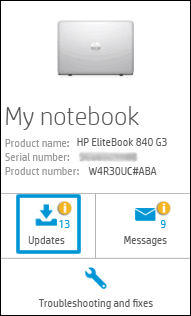
Click My devices in the top menu, and then click Updates in the My PC or My notebook pane.

-
Click Check for updates and messages to scan for new updates.

-
Review the list of updates. Updates with a yellow information icon are recommended. Updates with a blue information icon are optional.
-
Click the update name for a description, version number, and file size.
-
Select the box next to any updates you want to install, and then click Download and install.
Also ensure Windows is up to date.
Select the Start button, and then go to Settings > Update & security > Windows Update , and select Check for updates. If Windows Update says your device is up to date, you have all the updates that are currently available
You can refer this HP document for more assistance:- Click here
Let me know how it goes.
To thank me for my efforts to help you, please mark my post as an accepted solution so that it benefits several others.
Cheers.
Sandytechy20
I am an HP Employee