-
×InformationNeed Windows 11 help?Check documents on compatibility, FAQs, upgrade information and available fixes.
Windows 11 Support Center. -

-
×InformationNeed Windows 11 help?Check documents on compatibility, FAQs, upgrade information and available fixes.
Windows 11 Support Center. -
- HP Community
- Notebooks
- Notebook Video, Display and Touch
- backlight bleed and keyboard light

Create an account on the HP Community to personalize your profile and ask a question
04-01-2023 11:41 AM
Dear HP Support Team,
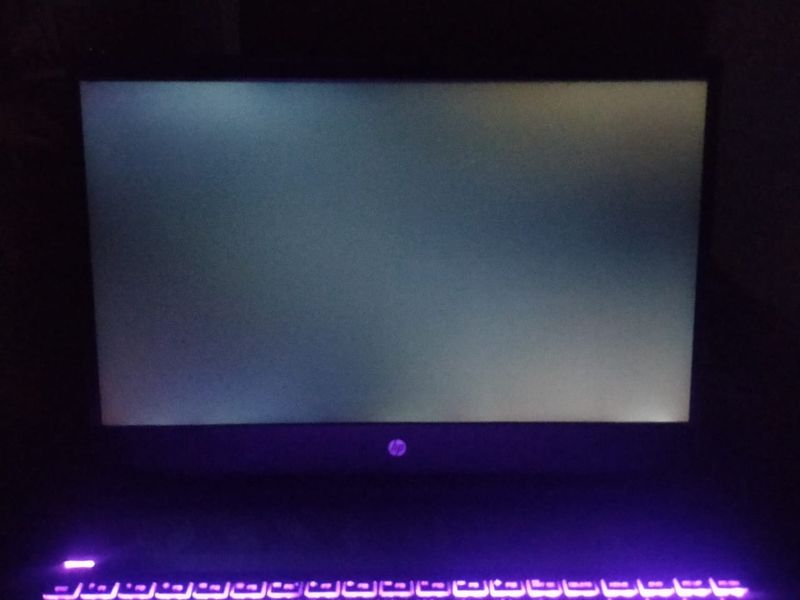
I am writing to bring to your attention the persistent backlight bleed issue that I have been experiencing on my laptop after the replacement of the display. Despite raising multiple complaints in the past, I have not received a satisfactory resolution to the issue.
The support team has only performed troubleshooting and reset my laptop, but the issue persists. Furthermore, I have been informed that there is nothing further that can be done to address the backlight bleed issue.
I am reaching out to request a proper resolution to this issue as soon as possible. I rely on my laptop for work and the backlight bleed issue is causing a lot of inconvenience and frustration.
I kindly request that you escalate this issue to the appropriate department and provide a permanent solution to the problem.
04-03-2023 09:40 PM
Hi @ASHU999,
Welcome to HP Support Community.
Thank you for posting your query, I will be glad to help you.
Backlight bleed is a phenomenon that occurs when light from the backlight of an LCD screen leaks through the edges of the display, causing uneven lighting and sometimes visible patches of light or discoloration on the screen. This can be caused by a variety of factors, including the quality of the display panel, the design of the screen bezel, and the positioning of the backlight.
If you're experiencing backlight bleed on your HP laptop, there are a few things you can try to reduce the issue. Firstly, you can try adjusting the screen's brightness and contrast settings to see if this helps to minimize the effect. You may also want to check the positioning of your laptop and the lighting in the room, as excessive glare or reflections can make backlight bleed more noticeable.
As for the keyboard light, some HP laptops come with backlit keyboards that allow you to type in low-light conditions. To turn on the keyboard backlight, look for a function key on your keyboard with a picture of a keyboard and a lightbulb. This is usually located on one of the F keys at the top of your keyboard (e.g. F5 or F12). Hold down the Fn key and press the keyboard backlight key to toggle the backlight on and off. If your laptop doesn't have a backlit keyboard, you won't be able to turn on this feature.
I hope this helps.
Take care and have a good day.
Please click “Accepted Solution” if you feel my post solved your issue, it will help others find the solution. Click the “Kudos/Thumbs Up" on the bottom right to say “Thanks” for helping!
Alden4
HP Support
HP Support Community Moderator